Sidechain filtering: changing what the compressor hears, not what you hear
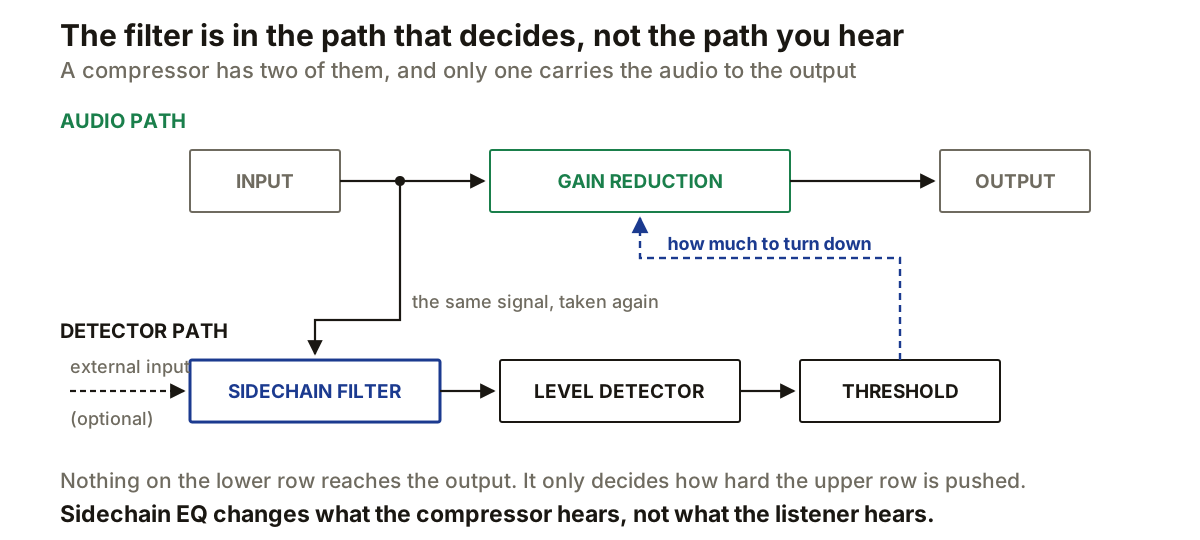
A compressor runs two signals at once, and almost every confusing control on it makes sense the moment you separate them. Audio goes through the signal path and comes out the other side with its level changed. A second copy goes through the detector, which decides when and how hard that gain change happens.
With ordinary compression both start from the same input, which is why it looks like one thing. It is not. Only one of them reaches the listener.
Threshold belongs to the detector
FabFilter defines threshold as the sidechain level above which gain reduction begins. Read that carefully: the sidechain level, not the input level.
So if you change what reaches the detector, you change which parts of the signal cross the threshold, without having touched the audio at all. That one sentence is the entire mechanism, and everything below is a consequence of it.
The filter removes nothing from the track
Take a drum bus with a heavy kick and a quieter snare. The kick dominates the detector, so every kick drives the compressor into gain reduction and the snare rides along on whatever is left.
Put a high-pass filter in the sidechain and low frequencies contribute less to the detector. The kick stops controlling the gain envelope. The bass is still in the drum bus, at exactly the level it was: the filter only ever touched the copy being measured.
This is the part that trips people up. A sidechain EQ looks like an EQ and behaves like a decision. If moving it changes the audible tone directly, either you are auditioning the detector or you are adjusting the wrong EQ.
Narrowing rather than removing
The filter can also work the other way. Instead of cutting what you do not want the detector to notice, restrict it to the band containing the event you do want it to follow.
De-essing is the familiar case. Sibilance sits in a narrower region than the whole voice, so emphasising that region in the detector makes the compressor react when sibilance rises. The gain stage can still act across the full signal.
FabFilter allows up to six EQ bands in the sidechain, with high-pass and low-pass slopes reaching 96 dB per octave plus a brickwall setting. Those are steeper than anything you would put on a mix, and they are steep for a reason: this filter is not being listened to, so the usual objections to a steep slope do not apply. Phase behaviour that would be a problem in the audio path is irrelevant in a path that only produces a number.
This is not dynamic EQ
The distinction is worth being precise about, because the two get used interchangeably and they do different things.
A full-band compressor with a filtered sidechain detects selectively and then reduces the level of the whole signal. A dynamic EQ detects selectively and reduces the level of one frequency region. Same detection idea, different gain stage.
If a vocal is harsh only on certain syllables and you want just that harshness reduced, dynamic EQ is the tool. If a bass is being triggered too eagerly by its own low end and you want the whole part to duck less often, a sidechain filter on a compressor is the tool.
The external input changes the source, not the principle
Once the two paths are separate, there is no reason the detector has to start from the same audio. FabFilter documents an external sidechain input for exactly this: one track triggers compression on another.
Bass ducking under a kick is the standard example. The bass is processed, the kick feeds the detector, and each kick that crosses the threshold pulls the bass down. Whether a compressor is the right tool for that, or whether a volume shaper does the job better, is a separate question.
Filtering still applies, and it matters more here than people expect. A recorded kick contains low body, beater click and spill from the rest of the kit. All of it reaches the detector unless you decide otherwise. Filtering the external sidechain lets you pick which part of the trigger actually triggers.
Audition the detector, then set the threshold
Both FabFilter and Ableton provide a listening function for the filtered sidechain. What you hear in that mode is not the output; it is what the detector is receiving, which is the only way to set the filter deliberately rather than by guesswork.
The order matters, and getting it wrong wastes the most time:
1  audition the detector
2  filter until the wanted trigger dominates it
3  set threshold against the filtered level
4  set attack and release last
Threshold comes after filtering because filtering changes the level arriving at the detector. Cut 6 dB of low end out of a kick-heavy sidechain and the detector sees a quieter signal, so a threshold that produced steady gain reduction before may barely trigger afterwards. Every time the detector signal changes substantially, the threshold needs rechecking.
The same split exists in a gate: FabFilter documents sidechain filtering there specifically as a way to narrow what opens it, which is why a gate’s threshold and its detector are separate problems.
Producer’s note
When a compressor reacts to the wrong thing, audition its sidechain before touching the main EQ.
The instinct is to EQ the track until the compressor behaves, which fixes the trigger by damaging the sound. Filtering the detector fixes the trigger and leaves the sound alone. They feel like the same move and they are not.
One test makes the difference obvious. Set up the sidechain filter, then bypass just that filter while watching the gain reduction meter. The meter should change and the tone should not. If the tone changes too, the filter is in the audio path and you are editing the wrong thing.