Stereo linking: the control that decides which channel pays
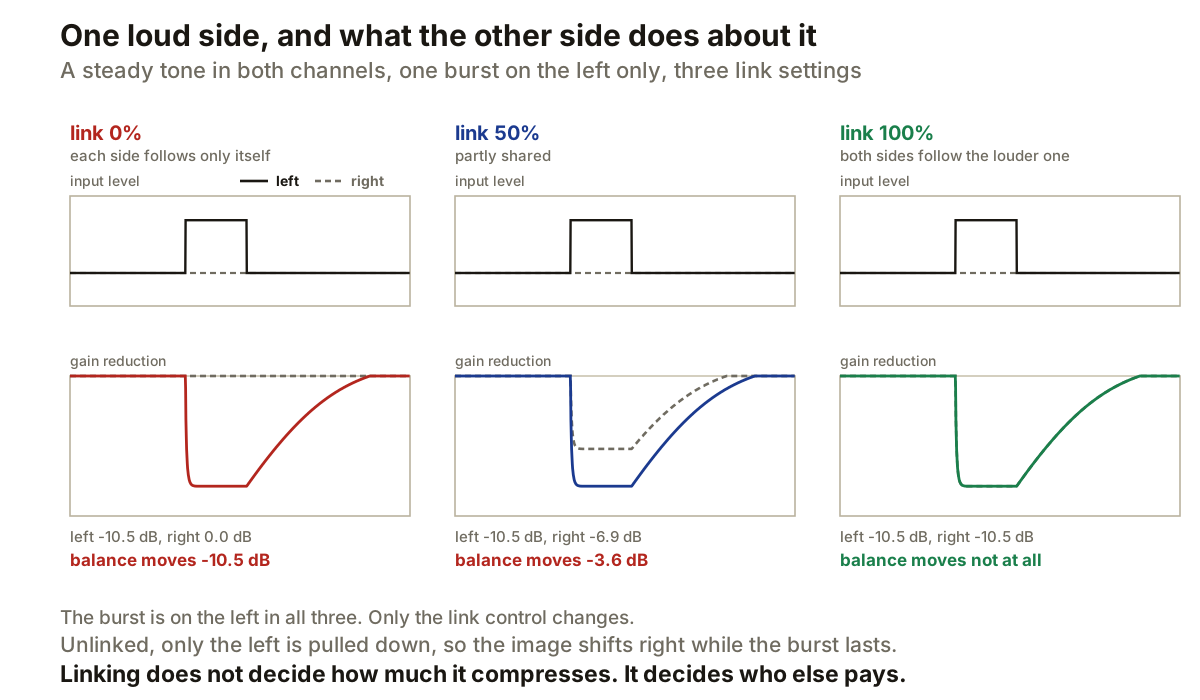
A stereo compressor has two gain stages and has to decide how much they talk to each other. That is all stereo linking is.
It does not change how hard the compressor works. It changes who else gets turned down when one side gets loud.
The two ends
FabFilter states both plainly. At 0% stereo link the left and right channels operate independently. At 100% they are fully linked and receive the same gain reduction.
Steinberg describes the same mechanism from the detector side in its brickwall limiter: with Stereo Link active, the channel with the highest level is used to analyse the input, and with linking off each channel is analysed separately.
Those are two descriptions of one thing. Linking decides whose level the gain computer is allowed to look at, which puts it in the same family as filtering a compressor’s sidechain: both change what the detector is fed without touching the gain stage itself.
What it costs, measured
The panels above are a real compressor run three times on the same input: a steady tone in both channels with one short burst on the left only. Threshold, ratio, attack and release never change. Only the link control moves.
At 0% link the left channel takes 10.5 dB of gain reduction and the right takes none. At 50% the right takes 6.9 dB. At 100% both take 10.5 dB.
The number that matters is the last row. During the burst the left is 16 dB above the right, because that is what the burst is. The question is what the compressor adds to that.
At 100% link, nothing: the balance comes out exactly as it went in. At 0% link the compressor moves it by 10.5 dB, pulling the left down while leaving the right alone. At 50% it moves it by 3.6 dB.
So the balance shift falls 10.5, then 3.6, then 0 as the link rises. That is the whole control, and it is the reason to care about a setting that otherwise looks like a preference.
Which one is right
Neither, and the question to ask is what the two channels represent.
If they are one stereo picture, a drum bus or a room pair or a mix, then the left-to-right relationship is information. A hard-panned hit should not drag the image sideways just because one detector worked harder than the other. Start linked.
If they are two unrelated signals that happen to share a file, a dual-mono recording of two different players, then forcing one side’s transient to turn the other side down produces gain movement with no relationship to the audio on that channel. Start unlinked, and ask whether they should be going through one compressor at all.
Everything between exists because most material sits between those cases. FabFilter offers a continuous range rather than a switch, and the middle panel shows what that buys: the right channel moves, but not as far as the left.
The same control on a limiter
Steinberg’s brickwall limiter uses the highest-level channel for analysis when Stereo Link is on. A peak on one side therefore pulls both sides down.
That protects the channel relationship and costs you headroom on a channel that never exceeded anything. Turn it off and each channel keeps its own headroom, at the price of letting the image move when one side is limited harder than the other. It is the same trade as on a compressor, with less room to be casual about it, because a limiter is usually the last thing in the chain.
A control with the same name and a different job
Worth separating before it causes confusion. Some processors use Stereo Link to mean that moving one knob moves the matching knob on the other channel. Apple documents exactly that in Stereo Delay, where linked controls keep their relative values when one side is adjusted.
That is parameter linking. It ties two controls together in the interface. It has nothing to do with coupling detector and gain paths, which is what the compressor control does. Same words, different machine.
Producer’s note
Test it with a signal you built rather than a mix. Put the same steady tone in both channels, add one short burst to the left only, and set the compressor so the burst causes obvious gain reduction. Then move the link control and watch the two gain reduction meters.
Hold threshold, ratio, attack and release still while you do it. Those change how much reduction happens and how fast. Moving them at the same time makes it impossible to see what the link control did on its own.
And if a stereo bus feels like it wanders while the compressor is working, that is the first control to look at. Not the ratio, not the attack. The image is moving because one channel is being turned down and the other is not, and a correlation meter will not show you that, because it reports shape rather than level.