Parallel compression: what the blend actually does to the ratio
Parallel compression is described often enough that the description has stopped meaning much: squash a copy hard, mix it under the original, get density without losing transients. All true, and none of it explains what the control on the front is doing.
What it is doing is summing two audio paths. That single fact predicts everything else, including a level trap that catches people before the compressor has done anything at all.
The two paths are audio, not envelopes
It helps to be exact here, because the loose version causes real mistakes. What reaches the bus is two pieces of audio, the original and a compressed copy of it, rather than two envelopes or two gain curves. They add sample by sample like any other pair of signals.
Which means the first thing to check has nothing to do with compression. Two identical, time-aligned copies of a signal sum to 6.02 dB louder than one. If your compressor return is passing dry signal as well as compressed signal, you have two dry copies in the mix and the whole thing is already 6 dB loud before you touch a knob.
So pick one method and stick to it. On an aux, the compressor goes 100 percent wet and the dry stays on the source channel. With a plugin that has its own mix control, use that and do not also feed it from a send. Mixing the two approaches is the most common reason a parallel setup sounds better on the first try and stops making sense afterwards.
The ratio on the compressor is not the ratio you get
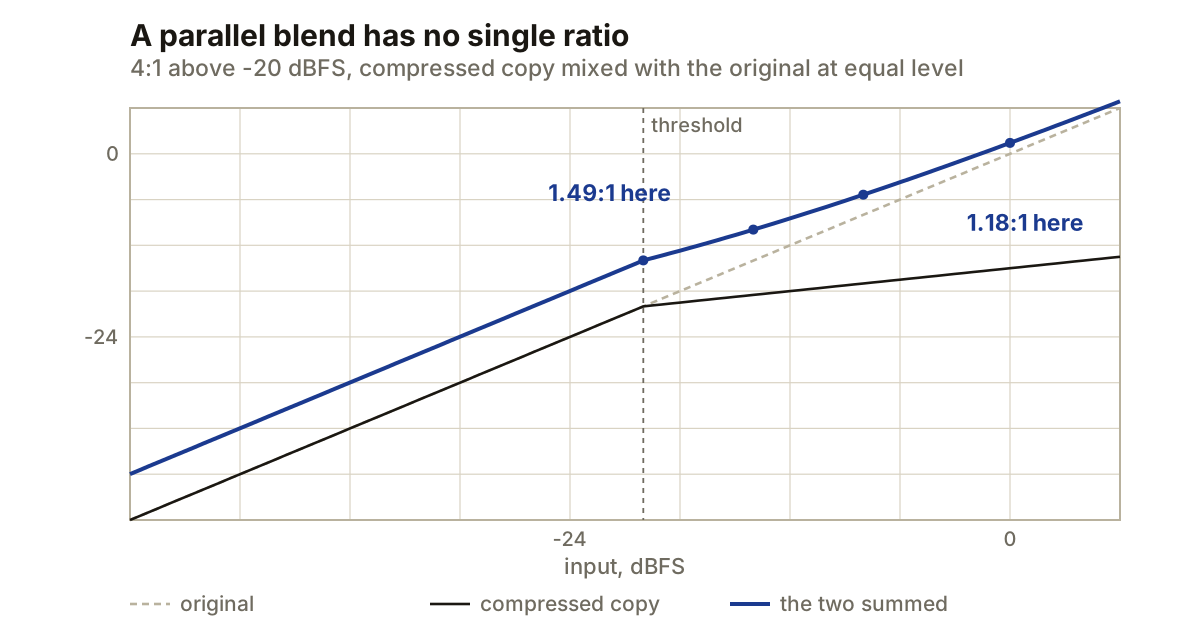
Set a compressor to 4:1 with a threshold at -20 dBFS and blend it equally with the original. The compressor is still doing 4:1. The sum is not.
Work it out at two places on that curve and you get two different answers. Just above the threshold, 6 dB more input gives about 4.04 dB more output, which is roughly 1.49:1. Up near full scale, 8 dB more input gives about 6.78 dB more output, or roughly 1.18:1.
That is the part worth carrying away, and it is why quoting a single number for a blend is misleading. The summed line is a curve. As the input rises, the compressed copy contributes proportionally less, so the sum leans further towards the original and the effective ratio keeps sliding back toward 1:1. There is no setting that makes it a straight line.
Pulling the wet path down moves the whole curve. At an equal blend, 12 dB in gives 8.62 dB out. Trim the return 6 dB and the same 12 dB gives 9.89 dB. Trim it 12 dB and you get 10.80 dB, which is very nearly the original untouched. The blend control is not a dry/wet between two tones, it is a lever on how much of the compressed shape survives.
What attack is choosing
Before the compressor has moved its gain, the copy is identical to the original. During that window the two paths sum to the full 6.02 dB, so a transient arriving at the return is briefly doubled rather than controlled.
Attack sets how long that window lasts, and that is the real decision. A fast attack shortens it, so the leading edge is caught on the compressed path and the original carries most of the transient alone. A slow attack lengthens it, so the front of the hit passes through both paths and gets reinforced.
Neither is correct in the abstract. If you want a drum bus to keep its snap and gain density behind it, you want the reduction in place early. If you want the hit to sound bigger rather than denser, letting the transient through both paths is exactly the trick, and it is worth knowing that is what happened rather than assuming the compressor added weight.
Release matters for the same reason at the other end. If the compressed path never recovers between hits, it stops being a parallel layer that breathes and becomes a quieter constant copy of the material.
Detector filtering is not EQ
A kick can pull the whole return down on its own. The fix is a high-pass in the compressor’s sidechain, which changes what the detector reacts to and leaves the audio being compressed alone.
That distinction is worth holding onto. An EQ in the audio path changes what comes back on the return. A filter in the detector path changes only when the compressor acts. If you high-pass the sidechain at 100 Hz, the low end is still compressed, it just is not what triggers the compression.
If the plugin can audition its sidechain, use it. Raise the cutoff until the gain reduction follows the part you meant rather than the loudest low-frequency event, then bring it back down until the kick is contributing again without dominating.
Alignment, and where it stops being automatic
Two paths only sum the way you expect if they arrive together. Anything with lookahead delays the compressed path, and inside one mixer your DAW’s delay compensation normally puts that right.
It stops being automatic when something leaves the host’s knowledge: outboard gear in the loop, or compensation switched off for low-latency tracking. A misaligned parallel path does not sound broken, it sounds thin, because the two copies partially cancel at some frequencies. The comb pattern that produces is the same one behind nudging a track off the grid, except here nobody chose it.
Worth being precise about the depth: complete cancellation needs two copies at equal level, and a parallel return is usually quieter than the original, so what you get is a shallow version. Shallow is enough to hear.
When it is the wrong tool
Parallel compression works on material whose peaks are already sitting where you want them and whose sustain falls away too fast. It lifts the quiet part of the envelope relative to the loud part.
If the peaks themselves are the problem, this does not solve it, and the doubling behaviour above means it can make it worse. Control them first, then decide whether the body needs help.
The other honest limitation is that the return lifts everything quiet, not just the parts you like. Room sound, bleed between close mics and the noise floor of the recording all come up with the sustain. Detector filtering changes what triggers the compression; it does not select which quiet material gets added back.
Producer’s note
Set the whole thing up with the compressor bypassed first, and check that the sum reads 6.02 dB above the original alone.
It sounds pedantic and it takes ten seconds, but that single measurement catches every routing fault this technique is prone to: a return passing dry signal, a polarity flip somewhere in the chain, or a delay compensation problem. If bypassed-and-summed does not give you 6 dB, the paths are not doing what you think, and nothing you set on the compressor afterwards will be a response to what you can actually hear.