Lookahead: why a limiter delays your audio to see a peak coming
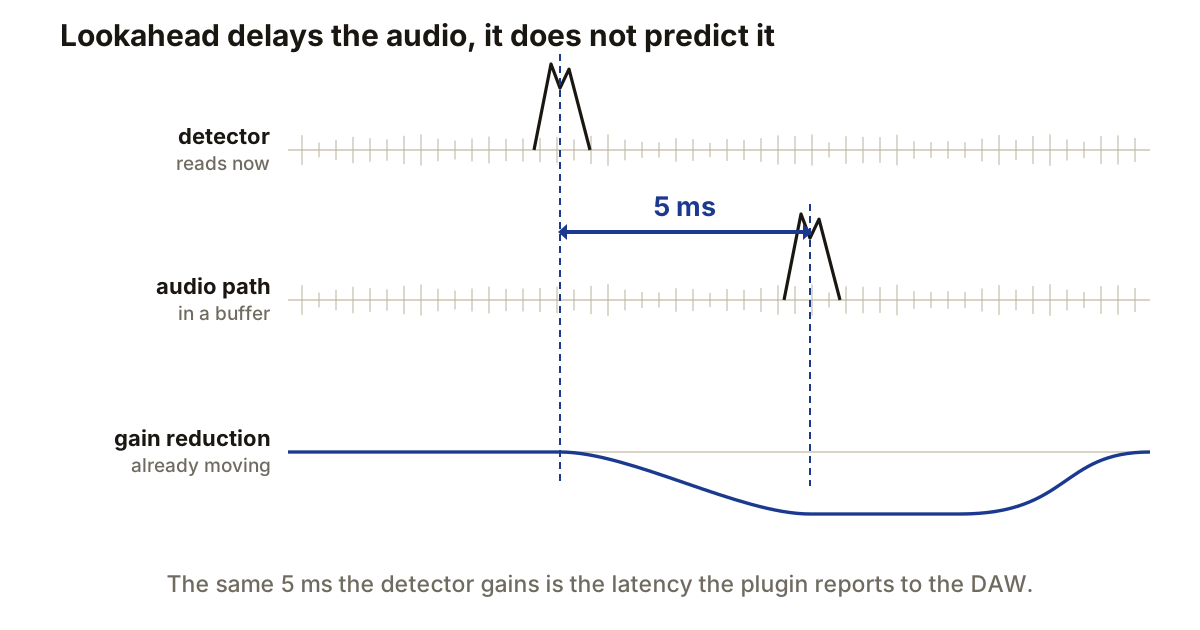
A plugin cannot know what the next sample holds. Lookahead is not prediction, it is a delay: the processor holds your audio in a buffer while its detector reads the signal that has already arrived, so by the time a peak reaches the gain stage the reduction is waiting for it.
That is the whole mechanism, and everything else about lookahead follows from it, including the part of the bill you pay in latency.
Two paths, one of them running late
Split the plugin in half. The detector gets the signal immediately. The audio you will actually hear goes into a delay buffer and comes out later.
Set 5 ms of lookahead and the detector is running 5 ms ahead of the audio. When it finds a peak, the gain computer has that whole interval to build a control envelope before the peak arrives at the output.
The sample count comes straight from the sample rate. At 48 kHz one millisecond is 48 samples, so 5 ms is 240 and 10 ms is 480. At 96 kHz the same 5 ms is 480 samples. The time does not change; the buffer just holds twice as many samples to represent it.
Lookahead and attack are different controls
Attack describes how the gain reduction develops once the detector has reacted. Lookahead moves when the detector reacts, relative to the audio. That is why a processor can use a gentle attack curve and still have reduction in place before a transient rather than after it.
The two interact at the short end. FabFilter’s limiter documentation is blunt about it: “Very short look-ahead times (less than 0.1 ms) will approximate ‘hard clipping’, introducing distortion and aliasing.” With almost no window, there is no time to move the gain smoothly, so the only thing left that stops a peak is cutting its top off.
Going longer is not automatically better either. A long window means the reduction starts well before the peak, which pulls down the material in front of it. On a drum bus that is audible as the hit losing its run-up.
A gate uses the same trick backwards
Without lookahead, a gate learns the signal crossed the threshold at the moment it crossed, then starts opening. The first part of the attack is attenuated while the gate is still on its way up, which is exactly the part of a drum hit you wanted.
Pre-open fixes it by the same delay. The detector triggers first, so the gate is already open when the delayed transient arrives. FabFilter’s gate offers up to 10 ms of it, and states the cost in the same breath: with lookahead enabled the plugin reports 10 ms of latency, plus more if oversampling is on.
Neither control replaces threshold, hold or release. Lookahead only changes when the processor knows something is coming. What the envelope does after that is still set by everything else.
The latency is not optional
Audio cannot leave the plugin until the lookahead interval has passed. 5 ms of lookahead is at least 5 ms of latency, before oversampling or anything else adds its own.
Your DAW handles this on playback through delay compensation, finding the longest path and delaying the others to match. What it cannot do is give a performer back the time. A singer monitoring through a processor with 10 ms of lookahead hears themselves 10 ms late, on top of the interface buffers and whatever else is in the chain, and no compensation scheme fixes that because the delay is happening on the way to their ears rather than between tracks.
This is what low-latency monitoring modes and the “live” switches on dynamics plugins are for. They disable lookahead. Use it while mixing and rendering, turn it off on anything record-enabled, and stop thinking of that as a compromise.
Parallel paths have to arrive together
Mix a delayed processed signal with an undelayed copy and you have built a comb filter. Inside one mixer, delay compensation normally prevents it, and this is one of the reasons a send-based parallel setup is safer than it looks.
It stops being automatic the moment something leaves the host’s knowledge. External hardware in the loop has a delay the DAW cannot measure. Compensation disabled for low-latency tracking is another. If a parallel chain sounds thin or hollow only in certain modes, that is the shape to suspect.
The check is mechanical rather than a matter of taste. Send a short impulse through both paths, record the returns, and measure the gap between their first samples. At 48 kHz, 240 samples means the processed path is 5 ms late. Delay the dry path by the same amount, or fix whatever stopped compensation from running.
Producer’s note
Before tracking, read the plugin’s reported latency in samples and convert it yourself: divide by the sample rate, multiply by 1000. At 48 kHz, 480 samples is 10 ms.
That number is worth knowing because of how it compares to the thing everyone reaches for first. Producers will drop the buffer from 256 to 128 to chase monitoring latency, which buys about 2.7 ms at 48 kHz and costs real CPU headroom. Switching off one lookahead limiter on the master can hand back 10 ms for nothing. Check what is actually in the monitoring path before you make the session harder to run.