Pre-fader and post-fader sends: what the switch actually changes
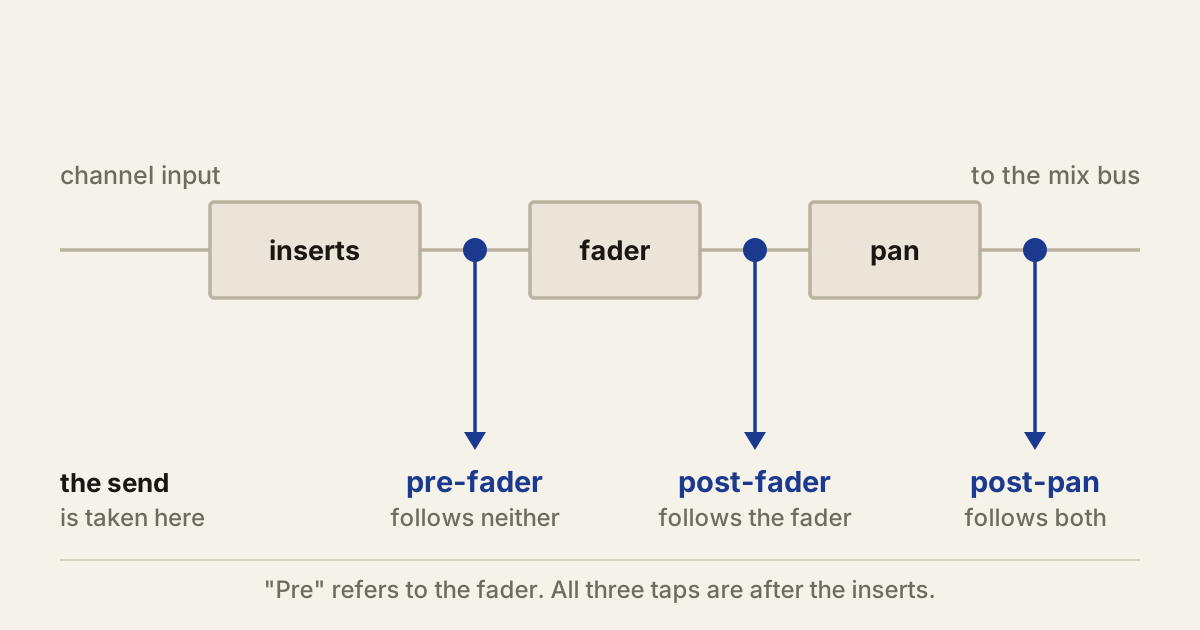
A send takes a copy of a channel and routes it somewhere else. The pre-fader or post-fader switch decides one thing only: where on the channel that copy is taken from. Everything else follows from that.
Get it right and reverbs stay glued to their sources while headphone mixes stay still. Get it wrong and you spend twenty minutes hunting for a track you can hear but cannot find.
Post-fader, and why it is the default
A post-fader send is taken after the channel fader, so the fader controls both the main mix and the send at once. Pull the channel down 6 dB and the signal feeding the send drops 6 dB with it.
That keeps the ratio between the dry sound and its effect constant. Lower a vocal in the mix and its reverb comes down too, instead of staying put and leaving the vocal sounding further away than you intended. The send knob sets how wet that source is; the fader sets where it sits. The two decisions stay separate, which is what you want.
It also means volume automation keeps working. A guitar fading out takes its delay with it rather than leaving a loud tail behind in an empty bar.
Pre-fader, and the two jobs it is for
A pre-fader send is taken before the fader, so moving the fader changes the main mix and nothing else.
The first job is a cue mix. A performer’s headphone balance should not shift every time you adjust the control room. Pre-fader sends give the cue its own level for every source, independent of whatever you are doing out front.
The second is an effect that has to survive the dry signal disappearing. Pull the channel to silence and a pre-fader send still feeds its destination, which is how reverb-only transitions and delay washes are built.
The same independence is what makes pre-fader sends confusing to debug. If a channel is inaudible in the mix but something is still arriving on a bus, check for an active pre-fader send before you go looking for hidden tracks or a routing fault.
The level jump nobody warns you about
Switching an existing send between the two modes almost never leaves its level alone, and the size of the change is predictable.
A post-fader send is the signal multiplied by the fader gain and then the send gain. A pre-fader send skips the fader entirely. So flipping post to pre multiplies the send by whatever the fader was attenuating.
The rule is short: the send level changes by however far the fader sits from unity, with the sign flipped. Fader at -6 dB, switch to pre-fader, the send gets 6 dB louder. Fader at -12 dB, it jumps 12 dB. Fader pushed to +3 dB, the send gets 3 dB quieter.
Only a fader sitting exactly at unity switches silently. That is why a reverb suddenly swamps a mix the moment someone changes the mode, and why the fix is to pull the send knob down rather than to assume the switch was wrong.
”Pre” means pre-fader, not pre-insert
This is the part that catches people. The word refers to the volume fader, not the channel’s plugins. In most DAWs a pre-fader send is still taken after the insert chain, so compression, EQ and saturation are all present in what gets sent.
Usually that is what you want. A singer generally needs to hear the compressed, EQ’d version of themselves in the cans, not the raw input. But it stops being what you want the moment something heavy is sitting late in the chain, because a high-latency mastering plugin on the way to a cue mix is a problem the performer will notice long before you do.
Some mixers offer more tap points than two, including pre-insert and post-pan positions. Which one a given send uses is worth reading in the manual rather than inferring from where the control sits on screen.
Post-fader is not the same as post-pan
Fader position and pan position are separate questions, and some DAWs let you answer them separately.
Logic Pro is the clearest example, with three options rather than two. Pre Fader is taken before the fader and the pan control, so it follows neither. Post Fader is taken after the fader but before the pan, so it follows level but not position. Post Pan follows both.
Neither behaviour is correct in general. A centred reverb fed by a hard-panned guitar can hold a mix together, because the ambience stays put while the source sits off to one side. A send that follows the pan keeps the source and its space in the same place, which reads as more natural on a recording of a real room. Pick per source, not per session.
Other DAWs handle this with an independent send panner or a switch that links it to the channel pan. The name differs; the question is the same one.
The ten-second check
After changing anything discussed here, move the channel fader and listen to the destination. If the send follows, it is post-fader. If it does not, it is pre.
That test takes less time than reading a manual and it survives the fact that no two mixers agree on where mutes, inserts and panning sit in the chain.
Producer’s note
When several tracks share one reverb, automate each track’s send rather than the reverb return. Moving the return changes the reverb level for everything feeding it, so a vocal throw on the chorus also blooms the snare, the guitars and anything else on that bus. Send automation gives you the throw on one source and leaves the rest of the space where it was.