Ring modulation and frequency shifting: same number, different spectrum
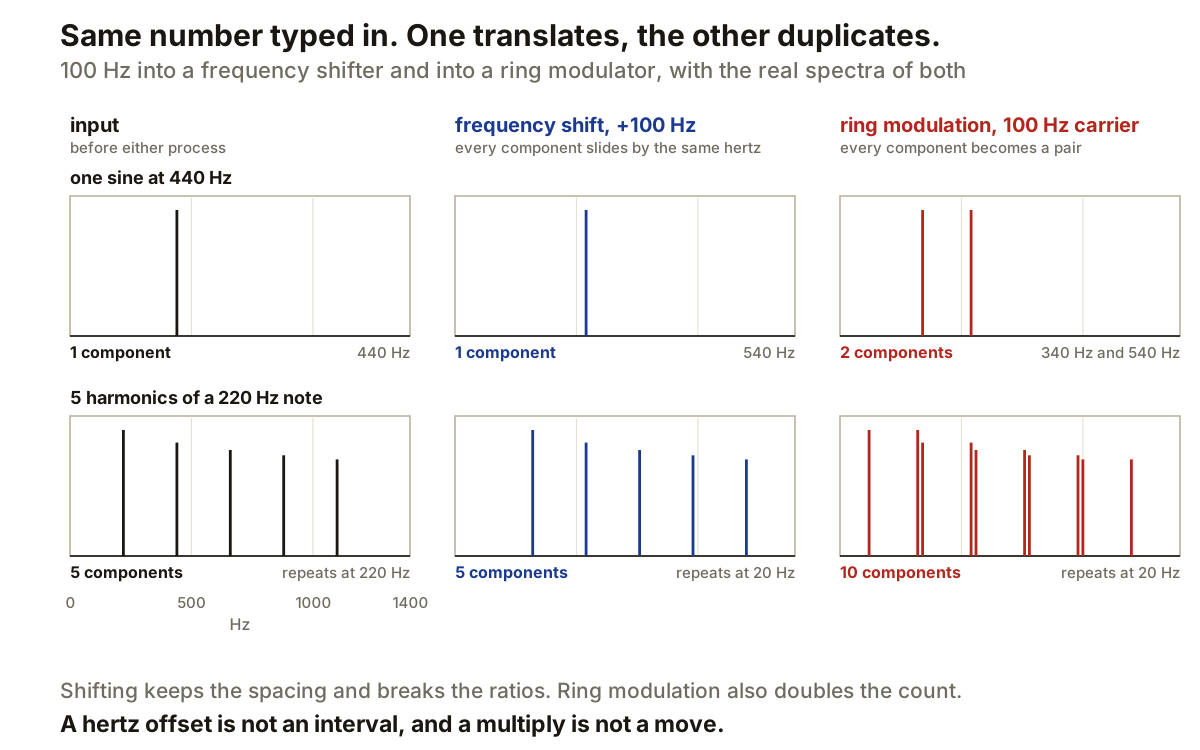
Two processors, both with a control marked in hertz, both of which move energy away from where it started. Ableton puts them in the same device: its Shifter has a Freq mode and a Ring mode, and the same number goes into either one.
They are not variations of one effect. One translates the spectrum. The other multiplies it.
What each one does to a single sine
Start with the case Ableton documents, because it settles the arithmetic before anything else gets complicated.
Feed in a 440 Hz sine and set the amount to 100 Hz. In Freq mode the output is one component at 540 Hz. In Ring mode the output is two components, at 340 Hz and 540 Hz.
The top row of the panels above is that experiment actually run. A real single-sideband shifter, built by taking the analytic signal and rotating it, and a real ring modulator, which is a multiplication and nothing else. One component in, one component out for the shifter. One in, two out for the ring modulator.
FabFilter states the mechanism from the oscillator side: ring modulation multiplies two waveforms and outputs the sum and difference of the frequencies present in each waveform. Multiplication is where the second component comes from. There is no second component in a shifter because there is no multiplication.
The arithmetic on one sine is the least interesting part
Anyone can do 440 plus 100 in their head. What that example cannot show you is what either process does to a signal that has more than one thing in it, which is every signal you will actually put through them.
The bottom row uses five harmonics of a 220 Hz note: 220, 440, 660, 880 and 1100 Hz.
After a 100 Hz shift there are still five components, now at 320, 540, 760, 980 and 1200 Hz. After ring modulation with a 100 Hz carrier there are ten, because every input component has become a pair.
That is the difference that matters at the mixer. A shifter hands back a spectrum of the same density. A ring modulator hands back one twice as dense, and on anything with real harmonic content that arrives as a substantially busier signal.
Why a shifted note stops sounding like a note
Look at what survives the shift and what does not.
The gaps survive. Before the shift the partials sit 220 Hz apart. After it they still sit 220 Hz apart, because every one of them moved by the same 100 Hz. Adding a constant to a set of numbers does not change the differences between them.
The ratios do not survive. 220, 440, 660 are one, two and three times a fundamental. 320, 540, 760 are not a whole-number multiple of anything useful: measured properly, that set repeats at 20 Hz rather than 220. The pattern is still periodic, but on a fundamental more than three octaves below the note you played, and the ear does not recover a note from partials sitting that far up a series.
This is the same arithmetic that decides whether an FM patch stays on the note. A hertz offset is an absolute distance. A musical interval is a proportion. Ableton keeps the two on separate controls for this reason: Pitch mode is calibrated in semitones and cents, Freq mode in hertz.
The carrier rate is what makes ring modulation a different effect
Multiplication by a slow signal and multiplication by a fast one are the same operation with very different results.
Ableton notes that Ring settings below the audible range, around 20 Hz or a little under, produce tremolo. Nothing about the maths changed. The sum and difference components are still there, but at a 5 Hz carrier they sit 5 Hz either side of each partial, close enough to be heard as one thing getting louder and quieter rather than as separate tones.
Tremolo and ring modulation are the same process at different speeds. That is worth knowing because it tells you which control to reach for when the effect is nearly right: the carrier rate is the boundary between a level effect and a spectral one.
And the shifter has its own low-setting behaviour
Small shifts do something too, by a different route.
Ableton recommends shifts of no more than about 2 Hz in Freq mode for phasing effects, with dry and processed signals mixed. A copy moved by 2 Hz drifts steadily out of phase against the original and back again, twice a second, which is interference between two nearby frequencies rather than any kind of modulation.
That gives a clean diagnostic when you are trying to work out what a patch is doing. If the effect disappears when you remove the dry signal, it was interference. If it survives on the wet signal alone, something is being multiplied.
Which to reach for
Use a shifter when one moved copy of each component is what you want: small amounts for phasing and stereo offsets, larger ones when you want the source to stop reading as a pitched note without changing how dense it is.
Use ring modulation when you want the pair. It suits material that is already inharmonic, and FabFilter describes the result of multiplying two waveforms as a signal rich in overtones, suitable for producing bell-like or otherwise metallic sounds.
Producer’s note
Test with a sine before you test with a mix. Put 440 Hz in, set the amount to 100, and look at the analyser: one line at 540 means you are shifting, two lines at 340 and 540 mean you are multiplying. That takes about ten seconds and removes all doubt about which mode a plugin is actually in.
On sustained material, reach for the shifter. It keeps the density of the source, so a pad stays a pad.
On percussion, reach for the ring modulator. Doubling the number of components matters much less on something that is already broadband, and the sum and difference pair is the whole reason the effect exists.