Note priority: why held keys change a monosynth phrase
A monophonic synthesizer can produce only one pitch at a time, but a keyboard player can still hold several keys. Note priority is the rule that decides which held key controls that single voice. Retrigger mode then decides whether the chosen note starts the envelopes again.
Those are separate decisions. A phrase can change pitch without creating a new attack, or retrigger the envelopes while following the same priority rule. Glide adds a third independent choice.
Priority selects one note from the held keys
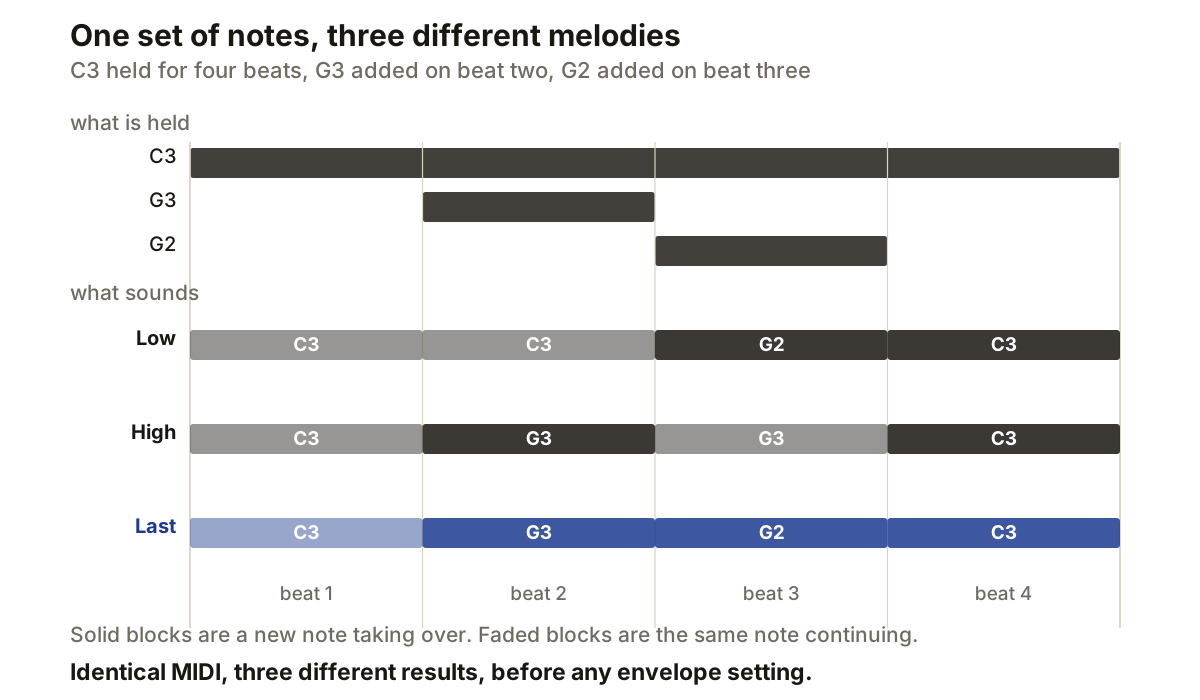
Low-note priority selects the lowest key currently held. Hold C3 and press G3 above it, and the oscillator stays on C3. Press G2 below it and the oscillator moves to G2. Sequential describes low priority as useful for trills made by holding a note and repeatedly tapping lower ones.
High-note priority reverses the pitch rule. With C3 held, G3 takes control while G2 does not.
Last-note priority ignores pitch order and selects the most recently pressed key.
The same three notes produce three different melodies:
held      C3 throughout, G3 on beat 2, G2 on beat 3

Low       C3    C3    G2    C3
High      C3    G3    G3    C3
Last      C3    G3    G2    C3
The priority rule also matters when a key is released. If the selected note ends while another key remains down, the synthesizer returns to an eligible held note without receiving another note-on event for that key. The pitch change on note-off is therefore part of the performance rather than an error in the MIDI clip.
Retrigger controls the envelopes
An envelope supplies a control curve after a trigger. It may control amplitude, filter cutoff or another destination. When overlapping notes change the selected pitch, the instrument must decide whether that change produces another trigger.
Arturia’s MiniBrute documentation defines envelope legato mode this way: with legato enabled, playing a new note while the previous key remains active does not trigger the envelopes again. With legato disabled, each key press triggers them.
Sequential combines the choices in names such as Low Note and Low Retrigger. Both use low-note priority. The retrigger variant starts the envelopes with each keystroke, while the other keeps the existing envelope cycle running through overlapping notes.
The result depends on the patch. If the amplifier envelope has already fallen to a low sustain level, changing pitch without retriggering keeps it there. Retriggering creates another attack and decay. On a filter envelope, the same choice decides whether each overlapping note receives a new cutoff movement.
Envelope reset behaviour can differ too. Some designs start a new attack from the envelope’s current value rather than returning to zero, which changes what repeated notes with long releases sound like. Check the instrument’s manual rather than assuming a Retrigger label defines the reset point.
Legato describes overlap
Legato playing means the next key is pressed before the previous key is released. In MIDI that requires the note events to overlap. Notes separated by a gap create a new phrase, because the instrument briefly has no held keys.
Apple distinguishes single-trigger and multi-trigger monophonic operation. Its legato mode retriggers envelopes only after all keys have been released and a new note begins. Its mono mode can retrigger new notes while remaining monophonic. Names differ between instruments, so the behaviour matters more than the label.
Shortening MIDI notes can therefore change more than phrasing. Removing an overlap creates a moment with no held keys, and the next note normally starts the envelopes even in a single-trigger legato mode.
Glide is another decision
Glide, also called portamento, moves pitch continuously between notes instead of jumping to the destination. It does not inherently specify note priority or envelope retriggering.
Some instruments apply glide to every pitch change. Fingered portamento applies it only when notes overlap: a new key must arrive while the old one remains held.
A legato phrase can glide without retriggering, or glide with another envelope attack. It can also jump directly while preserving the envelope, or while restarting it. Available combinations depend on the instrument.
The useful questions stay separate. Which held pitch wins? Does the envelope restart? Does pitch travel to the destination or jump there?
Test the rules before editing the phrase
Use a plain sustained patch with a clear attack and no delay or reverb. Hold one middle note, add a higher note, release it, then repeat with a lower note. The pitch path reveals priority. The repeated or uninterrupted attack reveals retrigger behaviour.
Add glide only after those two rules are clear. Perform the same test with overlapping notes and with a small gap between them. If the behaviour changes, the instrument is using overlap to select legato operation or fingered portamento.
When editing MIDI, preserve intentional overlaps. Quantising note starts while leaving note lengths untouched can produce different results from quantising both. If a line behaves differently after export or transfer, inspect note-off positions and event order before changing the synthesizer patch. The same caution applies to velocity edits, which can move a note across a layer boundary without changing anything visible in the piano roll.
Producer’s note
Build the four-beat test above once and keep it. It settles an instrument’s rules in under a minute.
Hold C3 for all four beats, add G3 during beat two, add G2 during beat three. Low priority should ignore G3 but take G2. High priority should take G3 but ignore G2. Last priority should follow each newly started note.
Then run it again with envelope retrigger disabled. What changes is the articulation, not the pitch path, and separating those two is what stops you editing MIDI to fix something that was a synthesizer setting all along.