EQ Q: why the same number does not give the same curve
Frequency says where an equalizer works. Gain says how far it moves. Q says how concentrated that movement is around the frequency.
All of which is fine until you copy a setting from one EQ into another, enter identical numbers, and get a different curve.
Q is not a standard
FabFilter states it plainly: EQ plugins and the technical literature interpret Q differently. Their own equalizer treats Q of 1 as its default bandwidth, and they warn that another processor can produce a different curve from the same displayed number.
So Q describes the bandwidth of a filter in that equalizer. It is not a portable value, and treating it as one is the source of most “why doesn’t this sound the same” moments.
The direction is at least consistent everywhere: higher Q means narrower. Steinberg and iZotope both define it the same way, as the width of frequencies affected around the centre.
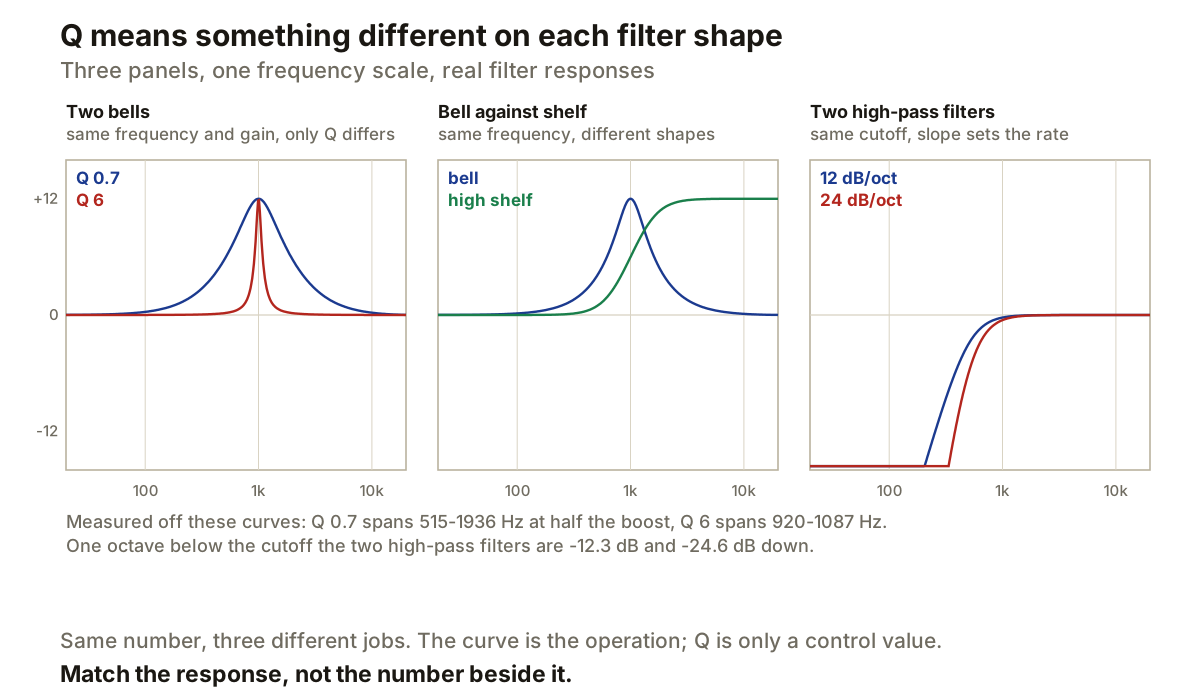
Those panels are real filter responses rather than drawn shapes. The two bells in the first panel have identical frequency and gain, and measured at half their boost the wide one spans 515 to 1936 Hz while the narrow one spans 920 to 1087 Hz. Same centre, same 12 dB, and one covers nearly two octaves while the other covers about a quarter of one.
Gain and Q are sometimes tied together
There is a second reason a copied setting can fail, and it is easy to miss because the numbers all match.
Ableton has an Adaptive Q mode where Q increases as boost or cut increases. FabFilter offers a Gain-Q interaction that narrows bell filters as gain rises. With either active, moving the gain is no longer a purely vertical change: the curve narrows as it grows.
Two bells can therefore show the same frequency, the same gain and the same Q, and still differ, because one of them changes its width with gain and the other does not. Matching at a small boost tells you nothing about what happens at a large one.
Shelves use Q for something else entirely
A bell returns to zero on both sides of its centre. A shelf does not: it moves to a new level on one side and stays there. That is a different shape, so the parameter controlling it cannot mean the same thing.
Steinberg notes that raising Q on its shelving filters can introduce a dip into the shelf. FabFilter says its shelves use internal Q values chosen for useful shelf shapes, and warns against assuming other equalizers read those values the same way.
The middle panel above shows both at the same frequency and gain. They are not variations of one shape; they are two different operations that happen to share two of their three numbers.
Cut filters have slope instead
A high-pass or low-pass does not have a boost or cut in the bell sense. It rolls away past its cutoff, and the thing describing how fast is slope, in decibels per octave.
The third panel shows the arithmetic holding: one octave below a 500 Hz cutoff, the 12 dB per octave filter measures 12.3 dB down and the 24 dB per octave filter 24.6 dB down.
Steinberg documents slope choices of 6, 12, 24, 36 and 48 dB per octave. FabFilter allows continuously adjustable slopes up to 96, plus a brickwall setting, and notes that Q cannot be adjusted at all on a 6 dB per octave slope in its implementation, because a single-pole filter has no resonance to control.
Slope and Q are independent. Slope sets the attenuation rate. Q, where it exists on a cut filter, shapes the region around the cutoff.
Reading a Q value properly
A Q value on its own is incomplete information. It needs the filter type beside it, because Q on a bell, a shelf, a notch and a resonant cut are four different things.
When you are rebuilding a setting from a screenshot or another session, work in this order: match the filter type first, then the frequency and gain, then adjust Q by looking at the resulting bandwidth rather than typing the number in. For cut filters, match the slope as well, and check whether the source EQ was using adaptive or proportional Q.
FabFilter’s own warning is the useful instruction here. The graph is not decoration. When transferring between different EQ designs, the response curve tells you more than the number printed beside it.
Producer’s note
Match the curve, not the number.
Set the same filter type, frequency and gain, then move Q until the bandwidth looks the same rather than until the readout agrees. If you have both plugins open, a null test settles it in seconds: put one on the signal, the other inverted after it, and adjust until what is left is as quiet as you can get it.
And when choosing Q rather than copying it, let the target decide. A broad bell for a tonal region, a narrow one when the problem itself is narrow. iZotope draws the same line, and it is a more useful starting point than any particular number.