Dynamic EQ: why it reacts differently from a multiband compressor
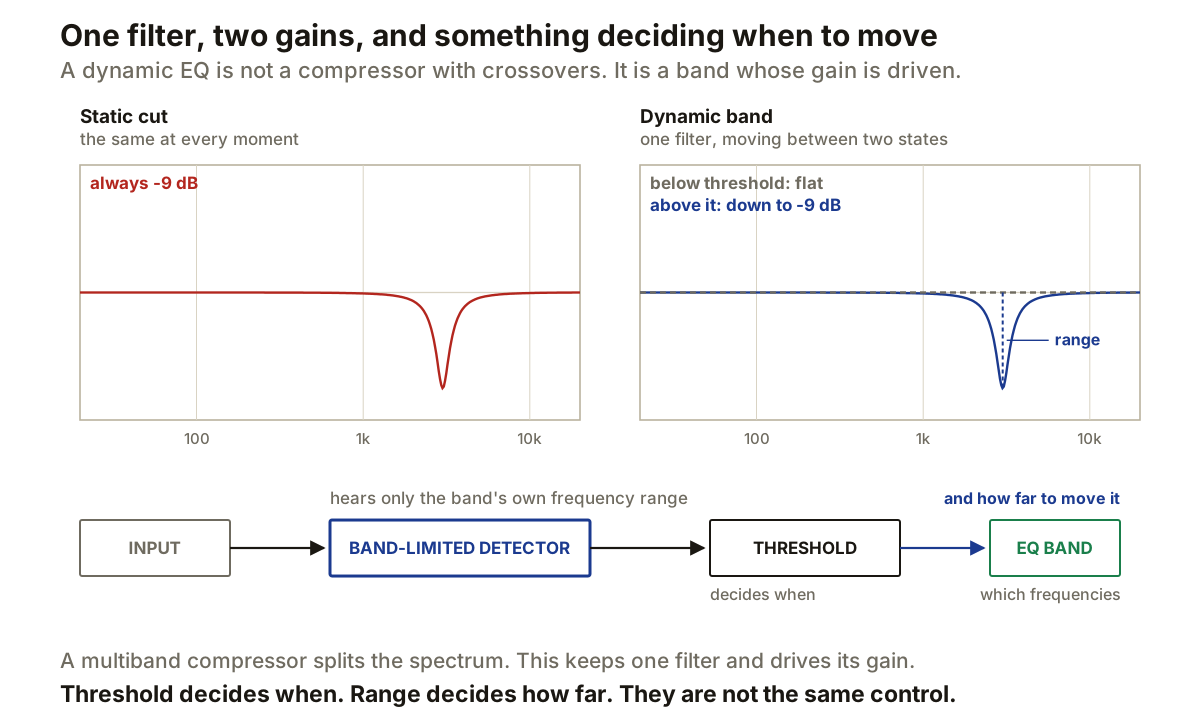
A static EQ holds the same gain until somebody moves a control. A dynamic EQ moves the gain of one band according to what a detector is hearing.
That sounds like multiband compression, and the two do overlap: both can pull a frequency region down when it gets loud. But they are built differently, and the difference decides which one is the right tool.
The second panel is the whole idea. Those are not two filters. It is one filter drawn at two gains, and the dynamic section decides where between them it sits at any moment.
The detector hears the band, not the mix
FabFilter’s default is the part worth knowing: a dynamic band triggers on a band-limited version of the input, matching the frequency range that band works on.
So a bell sitting at 3 kHz is listening at 3 kHz. A kick on the same track does not move it, because the detector never really hears the kick. That is different from a broadband compressor, where everything in the signal contributes to one detector reading.
It also means frequency and Q are doing two jobs at once. They shape the curve, and they shape what the detector notices. Widen the Q and the band both affects and listens to more material.
Threshold and range are not the same control
This is where most of the fumbling happens, because both look like “how much”.
Threshold decides when the band moves. Range decides how far it can go. FabFilter allows a dynamic range from -30 to +30 dB, negative for compression and positive for expansion, and shows the current movement separately from the maximum available.
The practical consequence is a diagnostic. If the band is triggering at the wrong moments, that is threshold. If it triggers in the right places but takes too much out, that is range. Raising the threshold to fix over-attenuation is the common mistake: it does reduce the damage, but only by making the band ignore events it should have caught.
There is one wrinkle to expect. FabFilter uses a soft knee internally, so movement can begin slightly below the displayed threshold. If it seems to start early, that is why.
Static and dynamic gain add up
A band can have both. Give it a permanent cut and a dynamic range on top, and the static part is always there while the dynamic part adds more when triggered.
That combination is often what you actually want for a resonance that is always slightly too much and occasionally far too much. Take the constant excess out statically, and let the dynamic section handle the peaks.
Where the multiband comparison breaks
A multiband compressor splits the signal into adjacent frequency bands and applies gain control to each. Every part of the spectrum belongs to some band, and the crossovers are a permanent feature of the signal path.
A dynamic EQ keeps individual filters. A narrow bell can be dynamic while the rest of the spectrum is untouched by any crossover at all. There is no requirement to divide the whole signal into contiguous regions just to treat one problem.
That is why a dynamic EQ suits a narrow, occasional problem. FabFilter’s own examples are exactly this shape: a narrow dynamic bell for sibilance, or brightening a kick and taming a hi-hat by acting only on transients.
The overlap with a compressor whose sidechain is filtered is worth being precise about too. Filtering a compressor’s sidechain changes detection while the gain stage still moves the whole signal. A dynamic EQ changes detection and confines the gain change to the filter. Same idea in the detector, different gain stage.
Timing, and the case for automatic
Attack and release control how quickly the gain follows the detector, and a frequency problem has a duration as well as a level. A brief resonant ping and a sustained one can cross the same threshold and need very different envelopes.
FabFilter’s auto mode makes attack, release and knee program-dependent, taking the audio, the frequency range and the current dynamic range into account, and continuously adjusts the threshold to the band-limited trigger. Its attack and release knobs sit at auto behaviour in their centre position, so you can move away from it by degrees rather than switching modes.
Auto is a reasonable default here in a way it often is not elsewhere, because the right timing genuinely depends on the frequency: low-frequency events take longer to develop than high-frequency ones, and the detector already knows which range it is watching.
The external trigger separates the two questions completely
A dynamic band can trigger from an external sidechain, and FabFilter band-limits that sidechain the same way, according to the Band or Free triggering option.
Band triggering follows the EQ band’s own frequency range. Free lets the trigger frequency be set independently, which breaks the last assumption holding the two together: the frequency being detected no longer has to be the frequency being changed.
That is worth restating because it is easy to skim past. With free triggering, a low-frequency event can control a band anywhere else in the spectrum. Detection frequency and processing frequency become separate variables, and a lot of otherwise awkward problems become straightforward once they are.
Producer’s note
Set the filter first as though it were a normal EQ, with frequency and Q chosen for the region you want controlled. Only then add dynamic range and watch when it moves.
If it reacts too often, look at the detector before narrowing the filter. Threshold changes how much level is needed; changing the band’s frequency or Q changes what the detector is listening to at all. Those are different fixes and they are easy to confuse because both make it trigger less.
If it triggers correctly but cuts too far, change the range and leave the threshold alone. That single distinction saves more time than any other habit with these processors.