Delay feedback: why 90 percent lasts much longer than 50
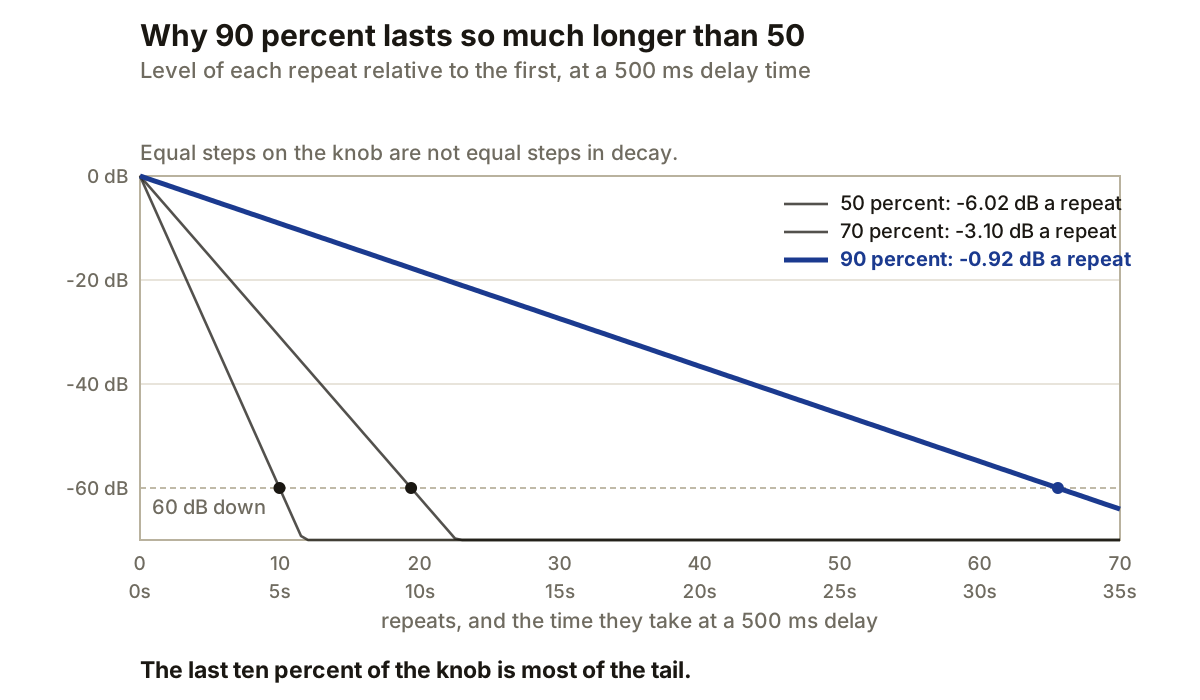
Feedback is the part of a delay that turns one echo into a tail. A percentage of the delayed output is sent back to the input, delayed again, then returned once more. The percentage looks linear on the knob. The decay it creates does not feel linear, because every repeat is multiplied by the previous one.
This is why moving feedback from 50 to 60 percent makes a modest difference, while moving it from 90 to 100 percent can turn a short echo into a loop that never decays.
Every pass multiplies the last one
Let f be the feedback value written as a fraction. Fifty percent is 0.5, ninety percent is 0.9. If the first delayed repeat has amplitude A, later repeats follow:
repeat_amplitude = A * f^n
n is the number of trips through the loop after the first repeat. At 50 percent the next repeat is half the first, the one after that a quarter, and after ten trips it is roughly one thousandth, because 0.5^10 is about 0.00098.
At 90 percent the tenth trip is still about 35 percent of the first, because 0.9^10 is about 0.349. The settings differ by 40 percentage points, and the remaining level after ten passes differs by a factor of about 350.
Convert feedback into loss per repeat
The usual amplitude conversion is 20 * log10(f), which is negative for any feedback below 100 percent:
 50 percent      -6.02 dB per repeat
 70 percent      -3.10 dB per repeat
 90 percent      -0.92 dB per repeat
100 percent       0 dB in an ideal loop
This assumes nothing else in the loop changes level. Real delay designs often place filters, saturation or both in the feedback path, and those stages alter the decay on every pass.
Delay time turns repeats into seconds
Once the loss per repeat is known, the number of repeats needed to fall by a chosen amount is the target drop divided by the loss per repeat. Multiply by the delay time for the tail length.
Use 60 dB as a comparison point, with a 500 ms delay:
 50 percent      10.0 repeats       5.0 seconds
 70 percent      19.4 repeats       9.7 seconds
 90 percent      65.6 repeats      32.8 seconds
This is a mathematical decay time relative to the first repeat, not a promise that the final echo remains audible. Audibility still depends on the source level and on whatever runs inside the loop.
The same feedback setting lasts longer in seconds when the delay time is longer. Doubling the delay from 250 to 500 ms leaves the loss per repeat unchanged, but doubles the time between those losses.
Processing inside the loop accumulates
A low-pass filter placed after the delay but before the feedback return acts again on every repeat. FabFilter documents this routing in Timeless: each repetition is filtered more than the one before it. A filter placed after the complete delay output behaves differently, because each repeat passes through it only once on the way out.
The distinction matters when building a delay from separate plugins. Put the processor inside the feedback route when its effect should accumulate. Put it after the delay when every repeat should receive the same treatment.
Gain inside the loop also becomes part of the effective feedback value. A feedback control at 80 percent followed by 0.5 linear gain returns 0.8 * 0.5, or 40 percent, before accounting for frequency-dependent changes. A gain stage above unity can push the loop towards growth even when the feedback knob reads below 100 percent.
FabFilter allows feedback above 100 percent and states that the repeats then grow while driving its internal saturation. In a plain loop with no limiter or saturating stage, values above 100 percent increase on every pass and can run away quickly.
Wet level does not set the decay
Feedback controls how much signal re-enters the loop. Wet level controls how much of the completed delay reaches the output. Lowering wet level makes the whole tail quieter, but it does not change the ratio between one repeat and the next.
On an aux return, keep the delay at 100 percent wet and set the amount with the send and return faders. Adjust feedback for the length of the tail. That keeps tail length separate from output balance.
Polarity and channel routing are separate again. Negative feedback alternates polarity on each pass while keeping the same amplitude decay for the same absolute percentage. Cross-feedback sends one channel’s delayed output to the opposite input, changing where repeats appear while the returned gain still decides whether the loop decays or grows.
Choose feedback from the tail you need
Start with delay time and required tail length. If a 500 ms echo needs to be roughly 60 dB down after 10 seconds, it has 20 passes available. Each pass must lose about 3 dB, because 60 / 20 equals 3. Converting back to linear gain gives about 0.708, so a feedback setting near 71 percent is the mathematical starting point.
Then add any filter or drive that belongs inside the loop and measure again. If the effect has a freeze control, check what it does rather than assuming it simply sets feedback to 100 percent. FabFilter’s Freeze ignores new input and feeds the existing delay back at 100 percent, which is a routing choice as well as a gain setting.
Producer’s note
At a 500 ms delay, 90 percent feedback needs about 66 passes, or 33 seconds, to fall by 60 dB. Raising it to 95 percent extends that to about 135 passes, or 67 seconds. Five percentage points doubles the tail.
That matters when automating a throw. If a delay is filling the gap before the next section, lower the input send first. Pulling feedback down after the loop is already full changes the decay of everything still circulating, which is heard as the tail suddenly shortening rather than as the throw ending.