DC offset: why a shifted waveform costs usable headroom
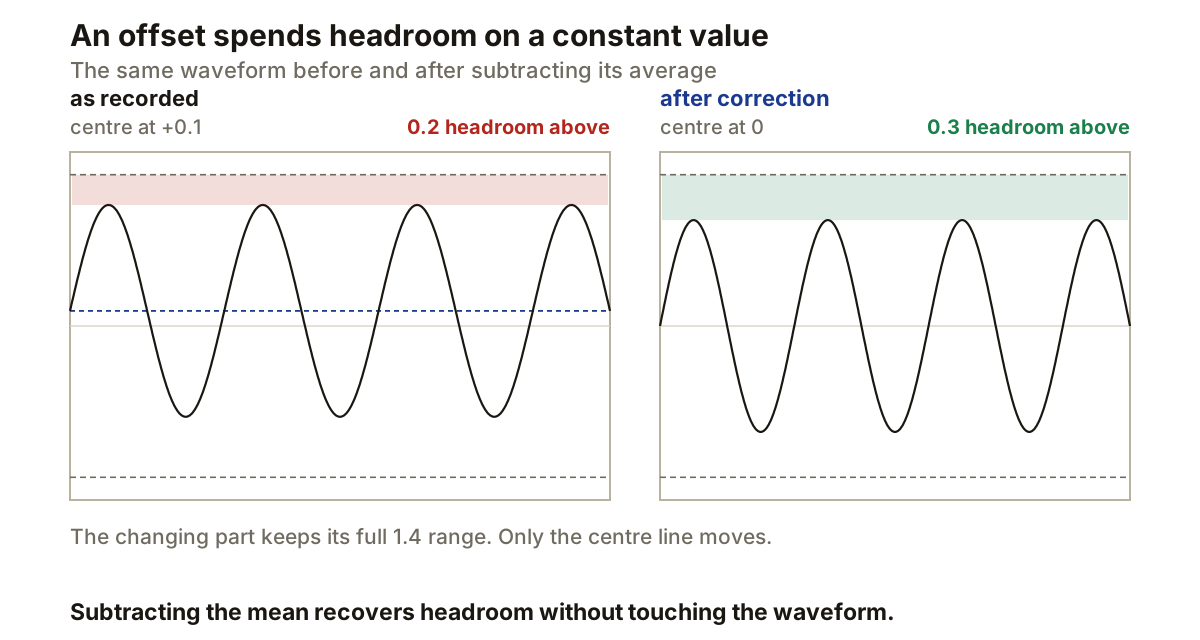
DC offset moves the average value of an audio signal away from zero. The waveform sits above or below its centre line even though its changing part may otherwise be undamaged.
That vertical shift consumes level without contributing to the wanted waveform. It reduces available headroom, alters amplitude measurements, and creates a discontinuity when a file begins or ends at digital zero. The repair is simple once the offset has been measured, but the visible shape alone can be misleading.
DC means an average away from zero
For a clip containing N samples, the arithmetic mean is the sum of every sample divided by N. A properly centred alternating signal has a long-term mean near zero. DC offset appears when that mean stays positive or negative across the recording. iZotope describes the same condition as a waveform whose average voltage lies above or below zero, and in a frequency analysis the constant component appears at 0 Hz.
Removing a constant offset means subtracting the measured mean from every sample:
corrected_sample = original_sample - mean
Suppose a waveform reaches +0.8 and -0.6 of full scale. The midpoint between those limits is +0.1, and subtracting it moves the limits to +0.7 and -0.7.
The changing part keeps its 1.4 peak-to-peak range. Only the centre moves.
Real programme material is rarely symmetrical enough for its peak midpoint to give an accurate measurement. The sample mean across the complete clip is the better test.
The offset spends headroom on a constant value
Digital full scale sets fixed upper and lower limits. A positive offset pushes the waveform closer to the upper limit and further from the lower one.
In the example above, the positive side has only 0.2 of full scale left before clipping. After correction both sides have 0.3. Removing the offset recovered 0.1 of positive headroom without changing the waveform’s amplitude at all.
This matters before normalising or limiting. An offset peak can reach the ceiling while the wanted alternating portion still has room on the opposite side. iZotope’s audio-repair documentation identifies reduced maximum level as one consequence, and Steinberg states that DC offset affects loudness calculations in WaveLab.
Amplitude-sensitive processing receives the shifted samples too. Any meter or processor calculating RMS, peak level or another amplitude statistic is working from values that include the offset. Measure and correct it before making final level decisions, and before checking true peak on a delivery file.
Why edits can click
A file boundary usually joins the audio to digital zero. If an offset recording begins at +0.1, playback jumps immediately from zero to +0.1, and the end makes the reverse jump. Adobe and Apple both warn that DC offset can cause clicks or crackling at the start and end of a file or region.
A short fade can hide the boundary discontinuity, but it does not centre the material between the fades. Repair the offset first, then make the edit or fade.
The same problem appears at an internal cut. Joining clips with different offsets creates a step at the splice even when both clips look quiet there. Correct each source across its complete recording before cutting it into smaller regions.
Do not confuse offset with waveform asymmetry
A waveform can spend more time on one side of zero without containing a constant DC component. Brass recordings, voices and non-linear processing can produce visibly unequal positive and negative shapes while their long-term average remains at zero.
iZotope distinguishes this asymmetry from DC offset. Offset produces energy at 0 Hz. Asymmetry changes the waveform’s positive and negative contours while keeping its average centred.
A repair based only on matching the highest positive and negative peaks can therefore push a healthy asymmetric waveform away from zero. Use a statistics function that reports DC offset, or calculate the mean across the complete clip. Cubase and RX report the result as a percentage of full scale and in decibels.
Short selections need caution. A low-frequency waveform can have a non-zero average across part of one cycle even though its average across the recording is centred. Steinberg recommends checking the complete file, because offset usually affects the entire recording.
Subtraction and filtering solve different cases
An offline Remove DC Offset command measures the clip and subtracts its constant component. That suits a recorded file whose centre has stayed displaced by the same amount. Logic Pro, Cubase, WaveLab and Audition all provide such a command.
A high-pass filter is another method, because DC occupies 0 Hz. iZotope’s documented DC filter uses a 1 Hz cutoff. A filter can operate during playback, which is useful when offset enters a live processing chain or changes during the recording.
Choose one method, then measure again. Applying repeated correction without checking can move the average in the opposite direction, particularly if each pass analyses a different selection.
Stereo files should be checked per channel. One converter channel can carry a different offset from the other, so subtracting a single shared value may leave both channels incorrectly centred.
Put the repair before level finishing
Correct DC offset before normalising, limiting or measuring final loudness. If the recording is clipped, Adobe advises running its DeClipper before changing the offset, because moving the waveform first can stop the detector identifying clipped samples that now fall below full scale.
A practical order:
1  keep an untouched copy of the recording
2  repair clipping, if the file needs it
3  measure and remove DC offset, per channel, across the whole file
4  edit, fade, set level, deliver
After correction, inspect the statistics rather than expecting an exact visual mirror around zero. A healthy asymmetric waveform may still look uneven. The figure that matters is its average value.
Producer’s note
Prove the measurement before trusting it on real material.
Generate a one-second sine and add a positive 10 percent DC offset with a signal generator, keeping the total below full scale so the offset does not clip it. Measure the file, repair its offset, then measure again. The reported mean should move from about +10 percent towards zero while the sine keeps the same peak-to-peak range.
If the peak-to-peak range also changed, the tool did something other than subtract a constant, and it is worth knowing that before you point it at a session.