Buffer size: the one setting you are supposed to change twice a session
An audio buffer is a chunk of samples the computer is allowed to work on before it has to hand the result back. Everything people argue about, latency and crackles both, comes out of how big that chunk is.
The arithmetic is simple enough to do in your head, and worth doing once so the numbers stop being mysterious.
The formula, and what it leaves out
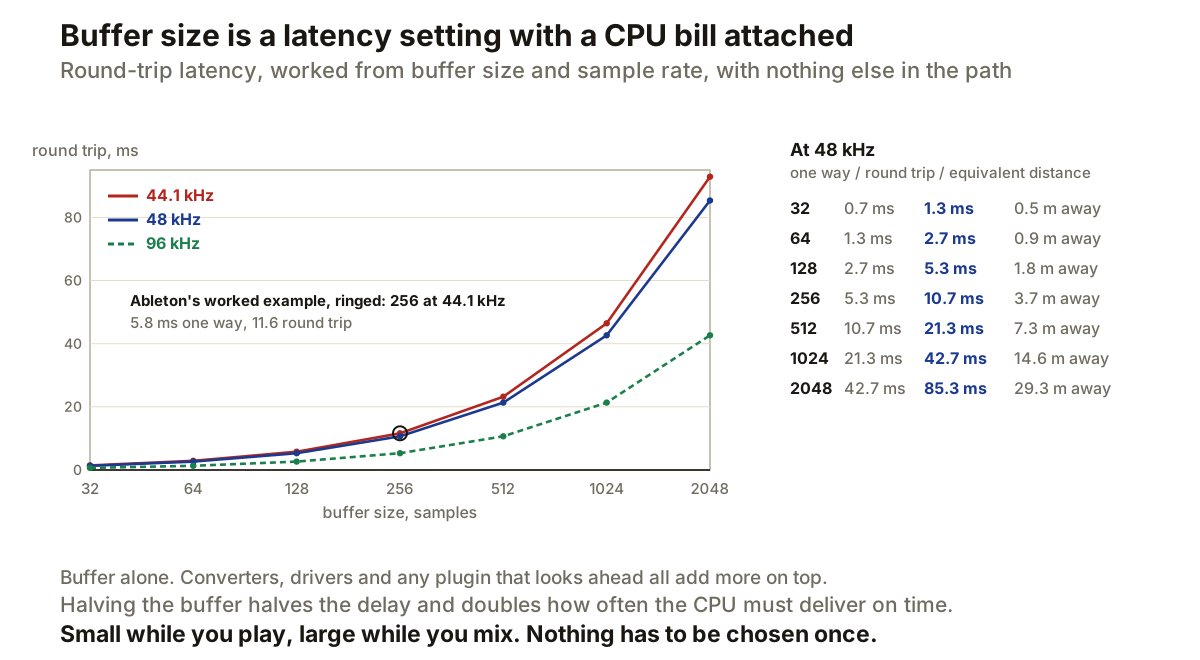
Ableton gives it plainly: buffer size in samples, divided by sample rate in kHz, is the expected latency in milliseconds. A 256 sample buffer at 44.1 kHz gives 5.8 ms.
That figure covers one conversion stage. The number you actually feel when playing is the round trip, in and back out again, which Ableton says to estimate by doubling it. So the same 256 samples at 44.1 kHz is about 11.6 ms from striking a key to hearing it.
The chart above is that formula run across the usual buffer sizes at three sample rates, and it reproduces Ableton’s published example exactly, which is the only reason to trust the rest of the line.
Two things it deliberately leaves out. Converters and drivers add their own delay on top, so every figure here is the best case rather than the reading you will see in your interface panel. Ableton also notes that some interfaces report inaccurate latency values, which is worth remembering before treating any displayed number as measured.
What the numbers feel like
Milliseconds are hard to judge, so the right-hand column converts each one into the distance you would have to stand from a speaker to get the same delay from air.
At 48 kHz, a 128 sample buffer is 5.3 ms round trip, about 1.8 metres. That is standing at a normal distance from a monitor, and nobody has trouble playing like that.
A 512 buffer is 21.3 ms, or 7.3 metres. That is across a large room, and it is roughly where playing a keyboard part starts to feel like fighting the instrument.
A 2048 buffer is 85.3 ms, nearly 30 metres. That is the back of a hall, and it is unplayable. It is also completely fine, because nobody is playing anything at that setting.
Sample rate is the other half
Latency depends on both numbers, and the buffer is only the one people touch.
Doubling the sample rate halves the delay for the same buffer. 256 samples is 10.7 ms round trip at 48 kHz and 5.3 ms at 96 kHz, because the samples are being consumed twice as fast.
That is a real option when you are tracking and short of headroom on the buffer, though it costs roughly double the processing per second in exchange, so it moves the problem rather than removing it.
The CPU side of the trade
Ableton is direct about what a small buffer costs: smaller chunks are loaded and unloaded much faster to maintain playback, which creates a higher CPU load, and if the CPU cannot keep up the missing chunks are heard as crackles or dropouts.
That is the part worth understanding properly, because it is not a gradual trade. The processing per second is roughly the same either way. What changes is the deadline. At 2048 samples the computer has about 43 ms to produce each block; at 32 samples it has 0.7 ms, sixty-four times less. Miss one deadline and you get an audible dropout rather than a slightly late block.
So a small buffer does not make your computer work harder so much as make it work to a much stricter schedule, and the failure is sudden instead of graceful.
Why it is two settings, not one
The reason this control causes so much trouble is that people look for the right value, and there isn’t one. There are two, and they belong to different halves of the work.
While recording or playing an instrument, the delay is the thing that matters and the track count is usually low. Small buffer.
While mixing, nothing is being played in real time, the delay is irrelevant because everything gets compensated anyway, and the plugin count is high. Large buffer.
Anything that looks ahead belongs to the second half for the same reason. A lookahead limiter adds its own delay on top of the buffer, which is harmless while mixing and intolerable while tracking.
Producer’s note
Change it twice per session and stop thinking about it. Small to record, large to mix, and accept that neither setting is a compromise you are stuck with.
If you get crackles at a setting that used to work, the buffer is not necessarily the culprit. The deadline only got missed because something else in the session got more expensive, so look at what you added before you double the buffer.
And if latency still feels wrong at a small buffer, check whether your interface offers direct monitoring. Routing the input to your headphones in hardware skips the round trip entirely, which no buffer setting can beat, because the signal never enters the computer at all.