Reading a spectrum analyser without chasing it
An analyser is the only meter in a mix that shows you something you cannot hear directly, which is why it gets trusted more than it should. It answers a narrow question accurately and stays silent about most of what you actually want to know.
Knowing which question it answers is the difference between a useful tool and a curve you end up mixing towards.
A flat mix does not look flat
Put pink noise through a normal analyser and it slopes downwards, steeply. Nothing is wrong with the noise or the meter.
Pink noise carries equal power in every octave. But an octave doubles in width as you go up, so the same energy in the 5 to 10 kHz octave is spread across ten times the bandwidth of the 500 Hz to 1 kHz octave. A display showing level per hertz therefore reads it as falling, by 3.01 dB per octave, which is just 10 log10(2) written out.
This is why analysers offer a slope or tilt control, usually with 0, 3, 4.5 and 6 dB per octave available. At 0 the display is honest about energy per hertz and music looks like a ski slope. At 3 pink noise draws a flat line. Higher settings tilt further, closer to what a lot of finished records look like.
None of those settings is correct. They are different ways of drawing the same data, and the only real mistake is comparing a curve at one setting against a reference at another. Pick one and leave it.
Note also what the 3 dB figure is and is not. It is display arithmetic about bandwidth. It says nothing about loudness, which involves the ear’s frequency response and is a different subject entirely.
The resolution problem lives at the bottom
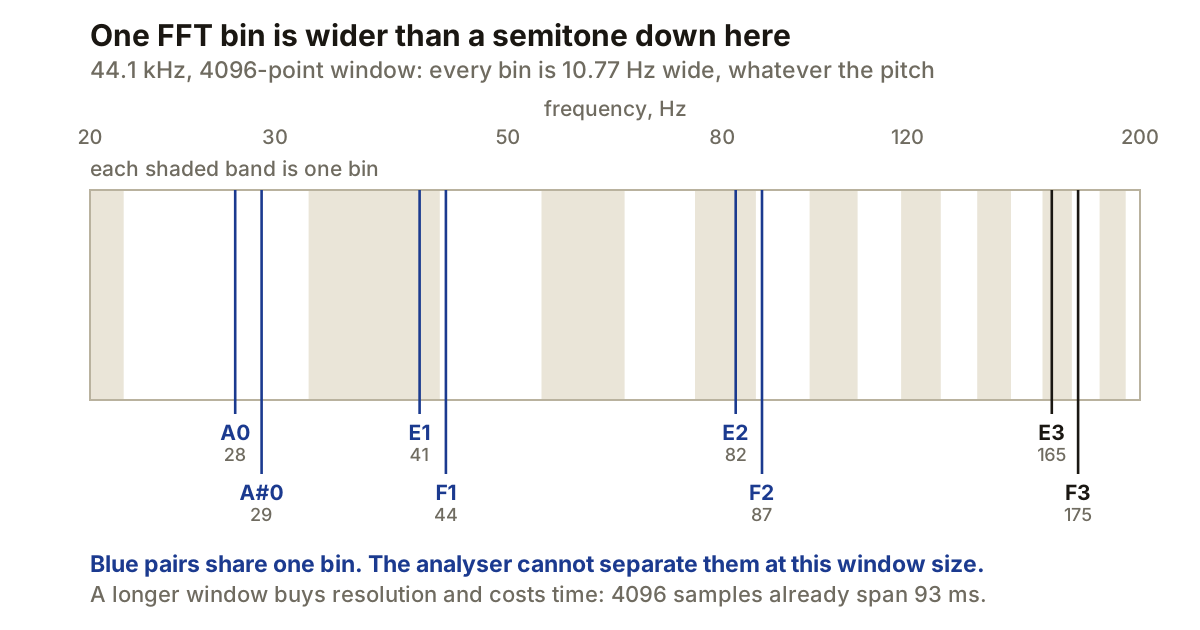
An FFT splits the spectrum into evenly spaced bins. Bin width is sample rate divided by window size, so a 4096-point window at 44.1 kHz gives bins 10.77 Hz wide, all the way up and all the way down.
Evenly spaced in hertz is the problem, because music is spaced logarithmically. Ten hertz is nothing at 5 kHz and it is more than a semitone at the bottom of a bass guitar.
E1 at 41.20 Hz and F1 at 43.65 Hz are 2.45 Hz apart. At this window they land in the same bin, so the analyser cannot tell you which one is ringing. The same is true of E2 and F2. By E3 and F3 the gap has grown to about 10 Hz and they separate.
Longer windows buy resolution and pay in time. 4096 samples already spans 93 ms of audio; 16384 spans 372 ms and takes the bin width down to 2.69 Hz. That is why a spectrogram of a drum part smears at large window sizes: the analyser is averaging a third of a second to tell you about a hit that lasted twenty milliseconds.
There is a further catch that the numbers alone hide. Analysers apply a window function, typically Hann, which widens each bin’s response to roughly two bins. So usable resolution at 4096 is nearer 21 Hz than the 10.77 the arithmetic promises. Treat the quoted figure as a best case.
What averaging is for
Most analysers run an average rather than showing every frame, and the setting changes what you are looking at rather than how accurate it is.
A fast or peak display follows individual events, which is what you want when hunting a resonance or watching a transient. A slow average settles into the balance of a section, which is what you want when comparing your mix against a reference. Reading the wrong one is a common way to chase a problem that was one snare hit.
The four things it is genuinely good at
Finding a resonance. You heard a ring, you want to know where. Play the passage, watch for the peak that stays while everything around it moves, and the analyser gives you a number to put a filter on. Faster and more accurate than sweeping a boost around.
Checking what you cannot monitor. If your speakers stop at 50 Hz, the analyser is the only thing telling you whether there is content at 30 Hz, and whether it is signal or rumble.
Comparing against a reference. With both at the same slope setting and matched loudness, the shape difference between your mix and a record you rate is real information.
Catching things that should not be there. DC offset, a mains hum sitting exactly at 50 or 60 Hz, a track still running that you thought was muted.
What it cannot tell you
An analyser shows magnitude. It does not show phase, so two mixes with the same curve can differ completely in how they sum to mono. It does not show dynamics, so a squashed master and an open one can trace nearly the same line. And it does not show masking, which is the actual reason instruments fight each other, because masking depends on level relationships over time and not on the average shape of the spectrum.
The failure mode is small and specific: you see a dip, you fill it, and you make a decision the room and the ear did not ask for. The meter had no opinion about whether that dip was a problem. It cannot have one.
Use it to answer questions you have already asked with your ears. When you find yourself looking at it to decide whether something is wrong, that is the point at which it has stopped helping.
Producer’s note
If you want to know exactly what a plugin did to your signal, an analyser is the wrong instrument for it and a null test is the right one.
Duplicate the track, process one copy, flip the polarity of the other, and sum them. What remains is precisely the difference. Two things have to be true for the answer to mean anything, though. The paths must be sample-aligned, so if the plugin reports latency you need delay compensation working or an offline render of both versions. And the level must match, because a gain difference alone leaves a residue that looks like processing and is not.
Done properly, silence means the plugin changed nothing, and whatever you hear is the entire effect, isolated. It settles arguments that no meter can.