NUSofting Dig Vox models a vocal tract instead of sampling a singer
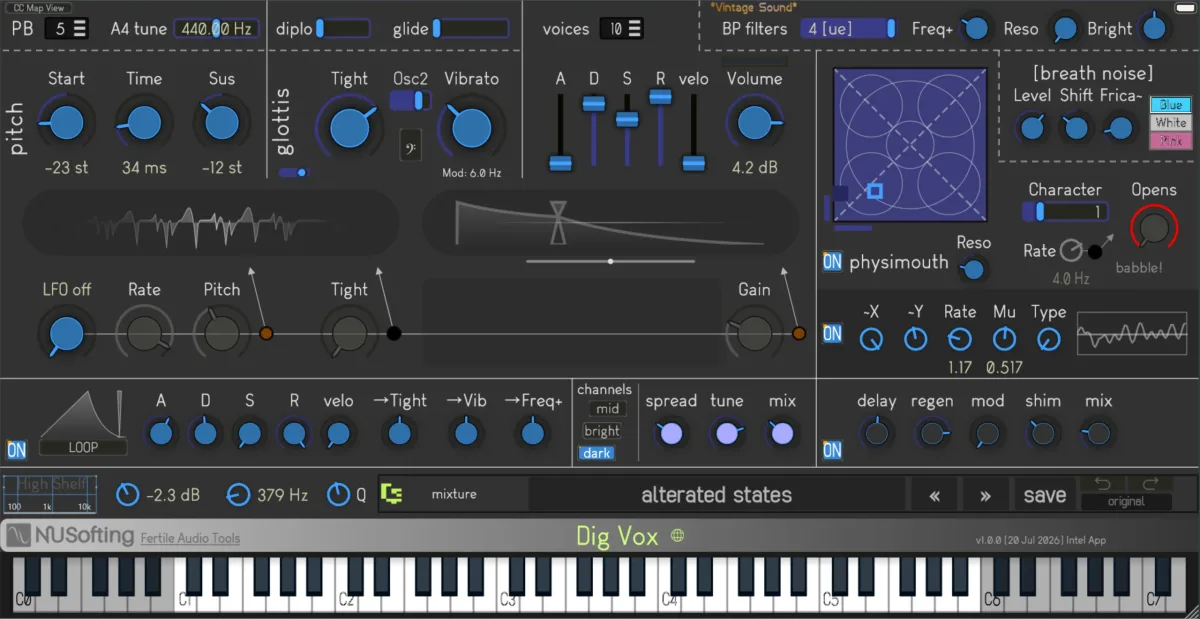
NUSofting’s Dig Vox does not begin with a recorded vowel. It builds one. A model of the glottis supplies the vocal-fold source, a physical model shapes the throat, mouth and tongue, and a bank of resonant filters pushes the result towards recognisable vowel sounds. The new €45 plugin is aimed at the space between an old formant synthesizer and a convincing human voice.
That distinction matters. A sampled choir lets you play back a captured performance at different notes, but the character of each vowel is already fixed inside the recording. In Dig Vox, the vocal tract is part of the synthesis engine. Its shape can move while a note is sounding, so a patch can pass through different vowel colours without switching samples.
The glottis model acts as the primary oscillator. NUSofting describes it as a model of the vocal folds rather than a conventional saw or wavetable source. A separate breath-noise generator adds turbulence, air and whisper, while the physical vocal-tract section provides the resonances that make the source read as a voice.
Four band-pass filters offer a second route to those resonances. They can be used for the more recognisably electronic side of formant synthesis, where several narrow peaks are placed around the spectrum to suggest an “ah”, “oh” or something less pronounceable. The physical and filter-based approaches sit in the same instrument, which is why Dig Vox can move between choir-like pads and sounds that are plainly synthetic.
Movement inside the voice
Dig Vox has four LFOs and two ADSR envelopes for animating the model. Polyphonic glide and an independent automatic bend for each voice add movement at note level, while MIDI CC learn makes the more useful vocal controls available to a hardware controller.
The first effects module is a four-voice multiplier and reflection processor designed to spread the sound in stereo. A second section supplies delay, chorus and reverb. Those effects suit the material, but they are not doing the main work: the changes in vowel and vocal character happen before the signal reaches them.
NUSofting calls the plugin a modern spiritual successor to hardware such as Yamaha’s FS1R, while being clear that it is not intended to replace a recorded vocal library. That is a sensible boundary. Dig Vox is for synthetic choirs, vocal textures and playable vowel sounds, not for entering lyrics and receiving a finished lead performance.
A few practical limits
The engine supports sample rates from 22.05 to 192 kHz and runs its models at the host rate without internal downsampling. NUSofting warns that CPU use rises above 48 kHz and recommends staying at or below 96 kHz. Rates below 44.1 kHz give the model a deliberately rougher, lo-fi character.
There is no full manual or official tutorial yet. Parameter descriptions appear when the pointer is held over the interface, and the plugin has its own patch manager. DAW projects recall the saved state correctly, although presets saved only inside a project return without a name in the plugin’s browser. Saving useful sounds through the internal manager keeps their name, author and notes available in other sessions.
Dig Vox is available for macOS as a 64-bit AU and VST3 plugin, and for Windows in 64-bit VST2 and VST3 formats. The free demo does not require registration and runs for 16 minutes before muting its output. Presets made in the demo can be opened by the full version.
Producer’s note
Start with one sustained vowel and move the vocal-tract controls slowly before adding chorus or reverb. Fast modulation turns the vowel change into an obvious effect. A slower movement can make a held pad breathe while leaving enough stability for the ear to hear it as one voice.
Read more at NUSoftinghttps://nusofting.net/plugins/dig-vox-vocal-synth