MIDI clock: why 24 timing messages can still drift
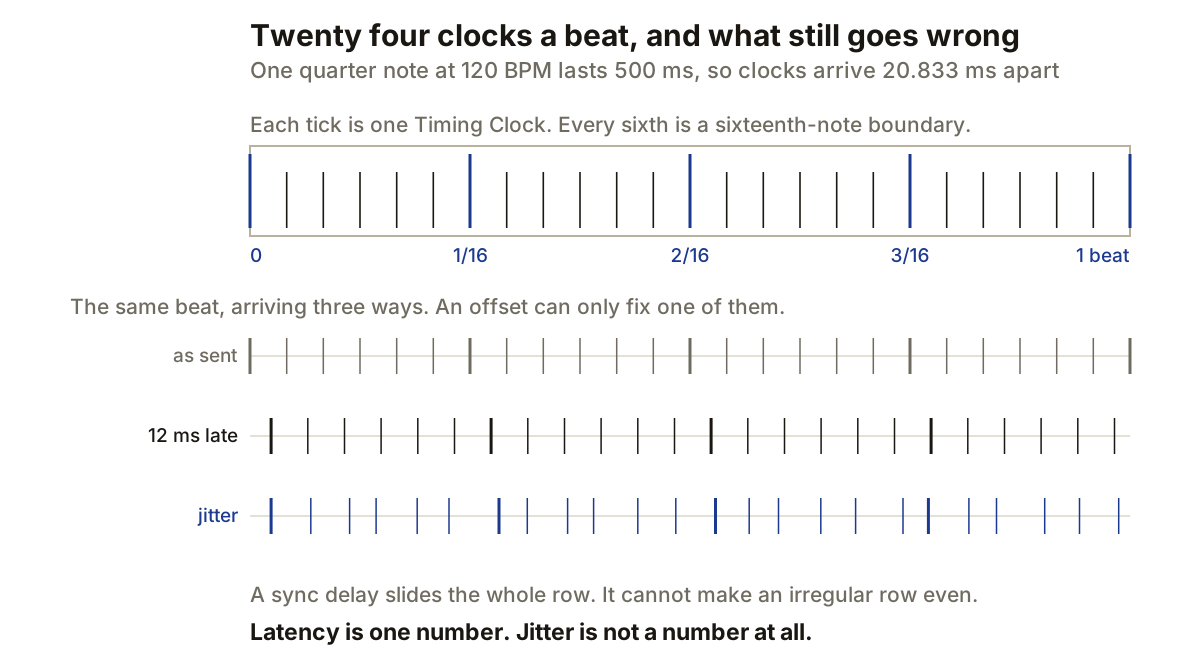
MIDI clock keeps sequencers and drum machines moving at the same musical rate. It does that with a stream of timing messages. The receiving device measures their spacing, follows the implied tempo and advances its own sequencer.
The protocol is simple enough to diagnose without guessing. Timing Clock is sent 24 times per quarter note. Transport and position use separate messages, which is why two devices can agree on tempo while starting in different places.
The receiver measures the gaps
A clock message does not contain a BPM value. Its meaning comes from when it arrives:
quarter_note_ms   = 60,000 / BPM
clock_interval_ms = quarter_note_ms / 24

120 BPM   500 ms per beat      20.833 ms between clocks
 90 BPM   666.7 ms per beat    27.778 ms
140 BPM   428.6 ms per beat    17.857 ms
Musical divisions follow from the same count. A sixteenth note occupies six clocks, an eighth note 12, and a 4/4 bar 96. Those counts describe the timing grid sent between devices. They do not describe the resolution of notes stored inside either sequencer.
If the intervals shorten, the follower raises its tempo. If they lengthen, it lowers it. Ableton notes that a follower can need a couple of measures to settle after playback begins, so an immediate measurement may include its initial adjustment.
Tempo, transport and position are separate
Timing Clock provides rate. Start tells the receiving sequence to begin, Stop halts it, and Continue resumes from the stopped position. These are System Real-Time messages, separate from the clock stream itself.
Moving the leader’s playhead requires another piece: Song Position Pointer. It represents location as a count of MIDI beats, each equal to six clocks. Since six clocks equal one sixteenth note, the pointer can place a compatible follower on that grid.
Compatibility is the catch. A loop-based drum machine may respond to Start but ignore Song Position Pointer or Continue. Ableton therefore separates Song and Pattern clock modes: Song sends position information with clock, while Pattern is intended for devices that run looped patterns and start at a bar boundary.
Test transport before blaming tempo. Start from the beginning, stop after two bars, then continue. Next, move the playhead to a later bar and press play. A device that follows the first test but restarts its pattern on the second has a position-handling problem rather than a bad clock rate.
Offset and jitter need different fixes
Latency is a consistent delay. Jitter is variation in that delay. They can produce a similar first impression, but a sync-delay control only fixes the first.
Suppose every kick from the hardware lands 12 ms after the DAW click. A clock-offset adjustment, or an equivalent delay applied to the DAW path, aligns the two. If the hardware alternates between 7 ms and 17 ms late, shifting the whole stream cannot make every hit land together. The average can be centred, but the variation remains.
Audio buffers and signal transmission create a fixed offset. Ableton recommends aligning the metronomes of leader and follower with the per-port MIDI Clock Sync Delay.
Measure after the initial settling period. Record a short percussive pattern from the hardware into the DAW, then compare its downbeats with a printed reference click, using at least eight bars. The first stable downbeat shows the offset. Comparing all later downbeats shows whether the error stays fixed or wanders.
A busy MIDI port can disturb the spacing
A physical MIDI connection sends data serially, one item after another. Notes and controller changes sharing the port with clock messages can delay some clock arrivals, and dense automation is a common way to create bursts of traffic.
Ableton recommends a dedicated MIDI port for sync messages where possible. That does not increase the protocol’s 24-clock grid; it reduces competition for transmission time.
If a separate port is unavailable, strip unneeded controller data before it reaches the output and avoid sending continuous high-resolution knob moves during the timing test. Run the clock and one simple note pattern first, then add the remaining traffic and record the hardware again. A larger spread between downbeats points to port traffic or processing load.
Computer MIDI timestamps help schedule events inside the host, but external hardware acts on data when it arrives. Interface drivers and operating-system scheduling can therefore affect the result after the DAW has placed an event correctly on its timeline, and the receiving device can add its own delay.
MIDI clock is not audio word clock
The shared word “clock” causes expensive mistakes. MIDI clock keeps musical tempo and transport in step. It cannot synchronise digital audio sampling.
Word clock, or an embedded clock in a digital audio connection, makes converters agree on sample timing. If two digital audio devices need a common sample clock, MIDI clock is not a substitute. You may need both at once: word clock for the interfaces, MIDI clock for the sequencers.
Keep one musical-time leader during testing, with sync enabled only on the output feeding the follower, and remove any return path that could create a loop before confirming transport behaviour. A fixed error calls for offset correction. A changing error calls for a cleaner connection, a less crowded port, a different interface, or closer inspection of the receiving device.
Producer’s note
At 120 BPM, record eight bars of a hardware kick alongside a printed DAW click. One 4/4 bar lasts two seconds. Ignore the initial settling period, then measure the remaining downbeats.
If every measured hit is 12 ms late, correct the clock offset by 12 ms and record again. If the error varies between hits, leave the offset centred and test a dedicated MIDI port instead.
That single distinction saves the most time. Delay compensation moves an average; it cannot remove variation, and hours disappear into adjusting an offset that was never the problem.