Dither: what it fixes, and why it has to be the last thing you do
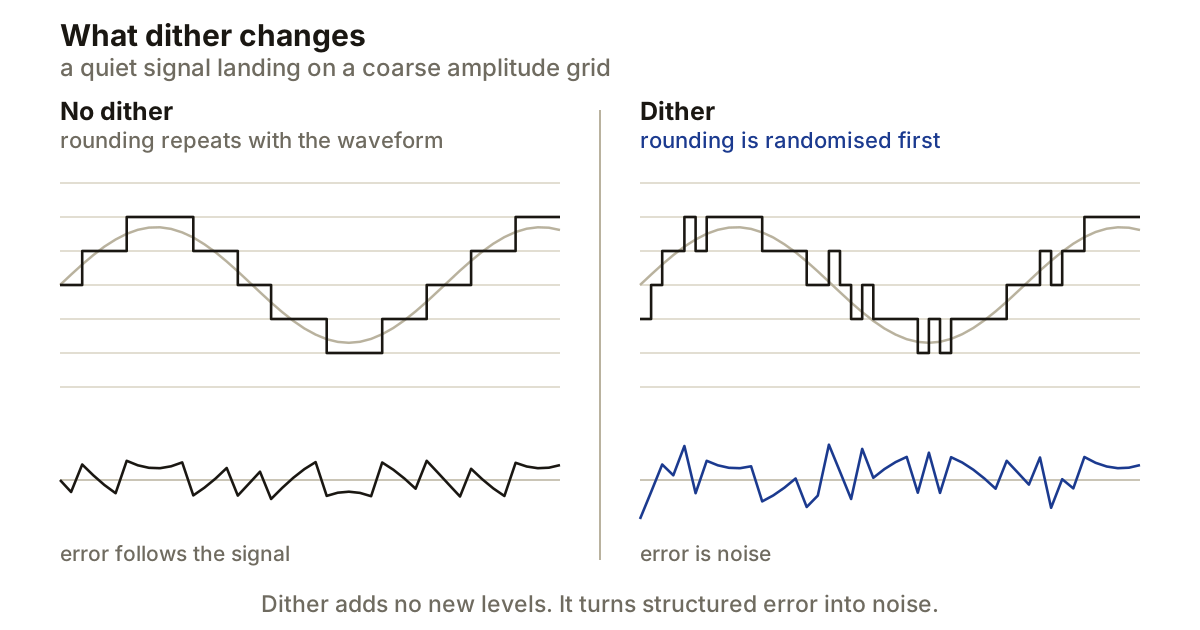
Dither is noise you add on purpose. That sounds like the opposite of careful engineering until you know what it replaces, which is a kind of distortion that tracks your music and gets worse as the music gets quieter.
It solves exactly one problem: writing a high-precision signal to a lower fixed-point bit depth. Everywhere else it does nothing useful, and adding it twice is worse than adding it once.
Bit depth is a grid, and rounding lands on it
Sample rate decides how often the waveform is measured. Bit depth decides how many amplitude values each measurement is allowed to take. More bits, finer grid.
Reducing 24-bit audio to 16-bit throws away eight bits. Every sample now has to land on one of the coarser values available, and the gap between where the sample was and where it had to go is quantisation error. Each bit is worth about 6.02 dB of range, so 16 bits give roughly 96 dB between full scale and the bottom of the grid.
If that error were random it would be hiss and nobody would care. The trouble is that it is not random. On a quiet sustained tone the rounding repeats in step with the waveform, because the same waveform keeps arriving at the same points between the same two grid values. Error that repeats with the signal is not noise. It is distortion, and it appears in a spectrum analyser as components sitting in fixed relationships to the note.
You hear it where the signal is quietest, which is the worst possible place: the end of a fade, the tail of a reverb, the last second before silence. The music thins out and something granular arrives underneath it.
What dither actually does
Dither adds a small random signal before the conversion. The converter still rounds every sample to an available value, but the random offset changes which way each one rounds. Across a lot of samples, the error stops tracking the material.
The trade is exact, and worth stating plainly. You give up a steady low-level noise floor and you get back the absence of signal-dependent distortion. Dither does not restore the eight bits you removed, and it does not make a 16-bit file sound like a 24-bit one. The comparison that means something is dithered against undithered at the same bit depth, not dithered against the high-resolution master you started from. The master is still the better file, which is why it stays in the archive.
It has to be last, and the master fader counts
Anything that changes sample values after dither undoes the relationship dither just set up. EQ, limiting, fades, normalising and gain all create new values, so all of them belong before it.
The trap is the master fader, because it does not look like processing. A dither plugin sitting in the last insert slot is still upstream of the DAW’s output fader, and if that fader is not at unity, it is scaling every dithered sample on the way out. Use a dedicated post-fader slot if your DAW has one. If it does not, leave the output fader at unity and make the final level move somewhere earlier.
Sample-rate conversion is the same argument. A resampler computes new sample values, so it has to come before dither, not after. If a delivery needs both a new sample rate and a lower bit depth, convert the rate first and dither as you write the final file.
One stage, not two
A mastering plugin and an export dialogue will both happily dither the same render. Pick one and switch the other off.
Two independent dither stages add two noise signals rather than one, and noise-shaped dither makes a particularly poor input for a second pass, because the second stage shapes noise that was already shaped. There is also a difference worth keeping straight between one final dither and one dither forever. If a genuine second word-length reduction comes up later, that reduction needs dither of its own. The clean way to handle it is to go back to the high-resolution master and make the new delivery from there, rather than processing a file that has already been dithered once.
Noise shaping moves the noise, it does not remove it
Plain dither spreads its noise fairly evenly. Noise shaping redistributes it, putting less where hearing is most sensitive at very low levels and more where it is not.
The total is unchanged. That makes noise shaping a delivery decision rather than something to print onto a file that might be processed again. If you are sending audio to someone else for mastering, send the format they asked for and let them handle the final reduction. Do not helpfully include a 16-bit version unless they requested one.
Producer’s note
You can prove all of this to yourself in about two minutes, and it is worth doing once so the effect stops being theoretical.
Make a 24-bit file containing a 1 kHz sine at -60 dBFS and fade it to silence over twenty seconds. Export it twice at 16-bit, once with dither off and once with a single dither stage. Put both into a spectrum analyser and watch the last few seconds. The undithered fade breaks into components locked to the tone as the level drops; the dithered one runs down into a flat noise floor and stays there. Keep the monitoring level low while you do it, because you will be tempted to turn up to hear the bottom of the fade and the top of the file is nowhere near as quiet.