Cableguys' TimeStop draws tape stops as automation, and can keep the beat
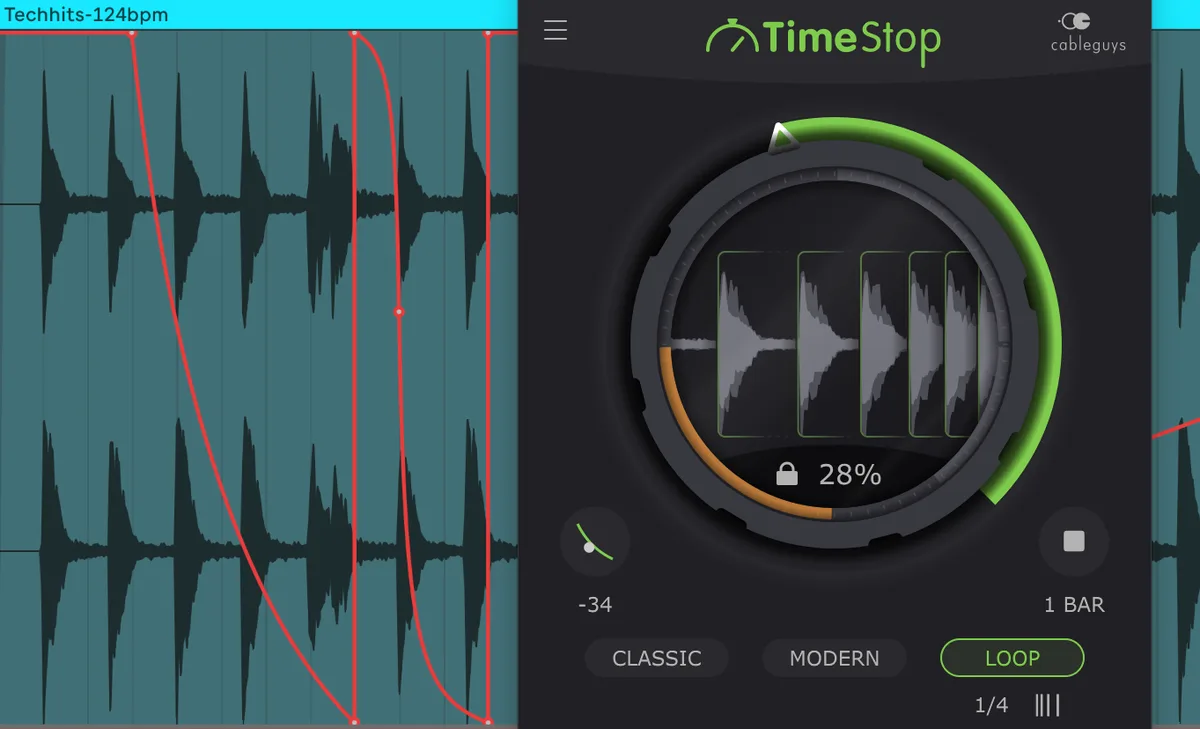
Tape-stop plugins usually work like a trigger: press a button, and a slowdown plays out according to a couple of timing sliders. TimeStop, which Cableguys introduced on 12 October, is built around one large Pitch knob that is fully automatable, so the slowdown is drawn as DAW automation in whatever length and curve you want. There is still a Stop button for a quick hit you can edit afterwards, but the automation lane is the main way in.
Cableguys calls it the first tape-stop plugin where you draw the slowdown as automation, which is its own claim.
Three ways to slow down
Classic mode does what a real tape stop does: pitch and time fall together, so the track drags as it drops.
Modern mode separates the two. It cuts the signal into segments, pitches each one down, and leaves each where it was on the timeline, so the pitch falls while the drums stay on the grid. The cuts land on tempo-synced note values or, in Auto mode, on the signal’s transients. That second option matters on drums, where a cut in the middle of a hit is more likely to be audible than one at its start.
Loop mode grabs a slice of audio and loops it the moment you click and hold the Pitch knob, then drops the loop in pitch as you turn it.
Two things to know
TimeStop only works while the DAW transport is running. And in Cubase, starting playback at a point where Pitch is below 100% can produce a silent gap because of Cubase’s pre-fetch stage; Cableguys’ workaround is to have Pitch back at 100% before the playback point.
Price and formats
€14 or $16, with a fully working trial. VST3 and AAX on 64-bit Windows 7, 8, 10 and 11; VST3, AU and AAX on macOS 10.15 or later, Intel or Apple Silicon.
Read more at Cableguyshttps://www.cableguys.com/timestop
Buy atPlugin Boutique