Baby Audio's HyperWarp chops the signal and lets you redraw the order
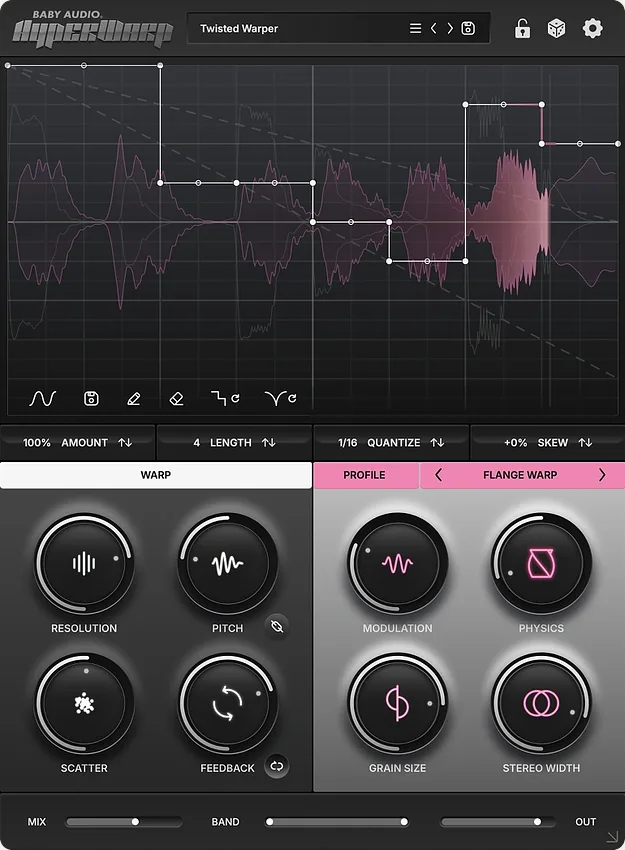
Baby Audio has released HyperWarp, a granular multi-effect whose interface is a graph rather than a rack of controls.
The description on its own page is unusually direct about the mechanism, which makes it easier to judge than most effects in this category. The signal is chopped into slots by the granular engine, then reassembled according to the sequence drawn on the graph.
That is the whole design. Everything else is what you are allowed to do to the pieces on the way back.
Per grain, not per patch
Baby Audio lists four things adjustable at the level of the individual grain: pitch, resolution, randomness and feedback. On the interface those are Pitch, Resolution, Scatter and Feedback, with Grain Size sitting separately alongside the profile controls.
Doing that per grain rather than per preset is the part worth noticing. A granular effect that applies one pitch offset to everything produces a texture. One that can give each slot its own pitch and its own resolution produces a sequence, which is a different kind of result and the reason the interface is a graph in the first place.
Seven effect profiles sit on top, and Baby Audio says each imparts its own character to the reassembled signal. That is their claim about the sound rather than a measurement, so treat it as the description it is.
What is actually verified
Formats are VST, VST3, AU and AAX, all 64-bit. macOS 10.13 and up with native Apple Silicon support, Windows 10 and newer.
Baby Audio is running 50% off at the time of writing and does not state an end date. Plugin Boutique lists it at €45.38 against €89.75, which matches that discount.
No release date appears on the product page.
Where it sits
Granular effects have been arriving steadily, and the useful question is what each one does with the grains once it has them. Minimal Audio’s Lucid spends its effort on keeping grains in key and in time with the session. HyperWarp spends its effort on letting you specify the order and the treatment slot by slot.
Those are close to opposite priorities. One is trying to make granular processing behave like the rest of the arrangement. The other is trying to make it produce something the arrangement would not have suggested.
Producer’s note
If the result turns to mush, go to Grain Size before the mix control. Grain length is what decides whether you hear discrete repeats or a continuous texture, and the point where one becomes the other is narrow. Resolution is a separate control on the same panel, so the two are worth moving one at a time.
And build the graph before touching randomness. A sequence you drew and then randomised is something you can still reason about. A sequence that started random is one you will be hunting through by ear.
Read more at Baby Audiohttps://babyaud.io/hyperwarp
Buy atPlugin Boutique