Diamond Color EQ 4 arrives with an AUTO control users are reading as a bug
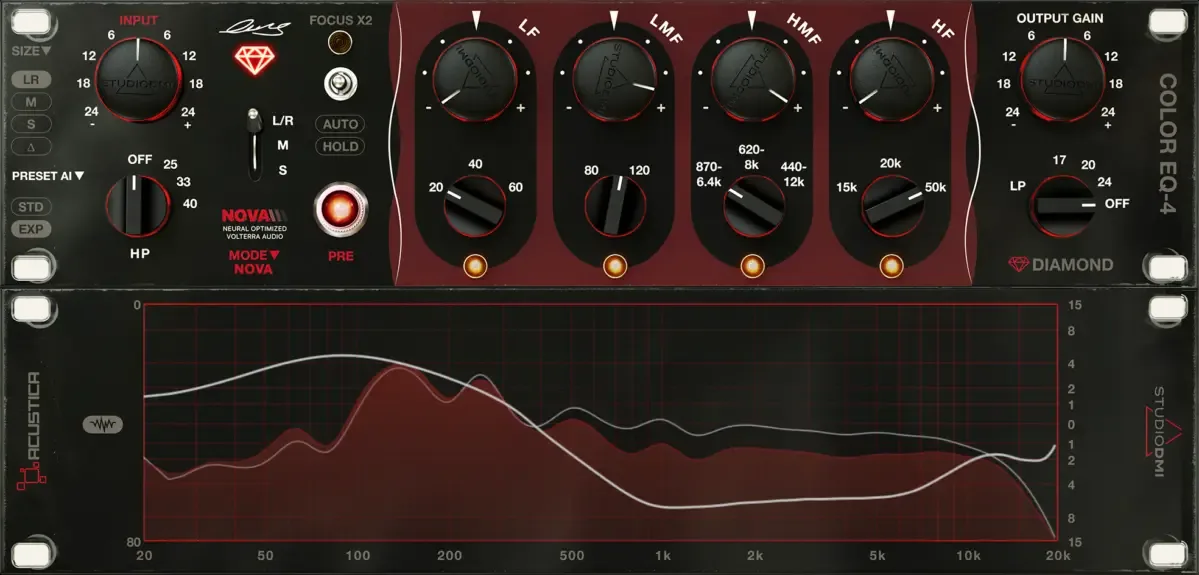
Acustica Audio have released Diamond Color EQ 4, the latest version of the equalizer they build with Luca Pretolesi of Studio DMI. Within hours of the launch thread opening, several users reported the output level jumping unexpectedly, and Acustica’s engineers replied with an explanation rather than a patch.
Both sides are right, which is what makes it worth writing down. The control is behaving as designed and the surprise is real.
What people are seeing
The reports are consistent and one of them is precise. Switching between the plugin’s NOVA, NOVA HQ and Legacy processing modes was measured taking a track that peaked at -0.2 dBTP up to +0.8, a rise of 1 dB. Worse, on a track peaking at -3 dB, applying a 3 dB boost and then undoing it in Reaper produced a peak of +8.3 dB.
That second one is an 11.3 dB jump, which is about 3.7 times the voltage. On a master bus, through monitors, that is not a subtle event.
The user who reported it also found the condition: it only happens with the AUTO function enabled, including when loading a preset that has AUTO saved into it. With AUTO off, no spike.
Why it does that
Acustica’s answer is that AUTO is a loudness control, not a peak control, and the distinction is the whole thing.
AUTO exists so you can compare settings at roughly matched perceived loudness while you make decisions, which is a genuinely useful thing when the EQ you are auditioning also adds saturation. Loudness and peak level are different measurements, though. A processor holding perceived loudness steady is free to let peaks move, and if the spectral balance changes it will.
The second mechanism is the PRE stage. Harmonic distortion adds energy, and it adds it in a frequency-dependent way, so peak level after a saturating stage is not predictable from peak level before it. Acustica note that a 1 to 2 dB change on a signal that was already near full scale is normal behaviour for that kind of processing rather than a fault.
Their recommendation is to treat AUTO as a temporary aid: switch it on, make the decision, then engage Hold, which freezes the compensation and stops it tracking.
Where the surprise comes from
None of that is unreasonable, and none of it is what most people expect from a control called AUTO.
The common assumption, encouraged by every auto-gain that has ever appeared on a compressor, is that automatic gain exists to stop the level changing. Here it exists to stop the loudness changing, which is a different job with a different measurement behind it, and on material with a lot of low-frequency energy the two can pull apart substantially.
The mode-switching case is a separate thing again. Acustica describe a brief interruption or level change while the plugin reloads a processing path, normally under a second. That is a reload artefact rather than the loudness system, and it is the sort of thing that reads as a bug even when it is not one.
The practical position for anyone trying it: leave AUTO off unless you are actively comparing, use Hold when you are done, and do not have a limiter-free monitor path turned up while you audition mode switches.
The rest of the plugin
The EQ is four bands with fixed frequency choices rather than continuous sweeps, which is the Pretolesi part of the design: 20, 40 and 60 Hz on the low band, 80 and 120 on the low mid, three overlapping ranges on the high mid running from 440 Hz up to 12 kHz, and 15, 20 and 50 kHz on top. Every band is plus or minus 12 dB, halved to 6 dB by a FOCUS X2 switch for mastering work.
Fixed frequencies are a deliberate constraint. The argument for them is that a short list chosen by someone who mixes for a living gets you to a decision faster than a continuous knob, and the argument against is that the frequency you want may not be on the list.
NOVA, the processing behind it, stands for Neural Optimized Volterra Audio. Acustica describe it as blending their existing Volterra kernel approach with neural modelling, weighted by signal level: Volterra dominant when quiet, the neural component contributing more as level rises, with both running rather than switching between them. The stated goal is avoiding an audible transition between clean and driven behaviour.
It costs something. One user reports 20 percent CPU for a single instance on an M3 MacBook Pro with the PRE stage on in NOVA mode, dropping considerably with PRE off or in Legacy mode.
Price, and the argument about upgrades
Introductory price is 99 euros against a 199 list, until 9 September. There is a 30-day trial, and Acustica are open that the first four weeks are an introductory period during which the plugin may change.
The launch thread also reopened a longer argument about paid upgrades, with some owners of earlier Diamond versions unhappy that a new engine arrives as a new product rather than an update. Acustica’s reply was that Diamond is ten years old, that it has had engine rewrites, the Apple Silicon transition and a decade of operating system changes absorbed at no cost, and that many of this year’s upgrades have been free.
That is a fair account as far as it goes, and the counter-argument, that a perpetual licence tied to a mandatory activation server is only as perpetual as the server, is also fair. It is not a dispute this release will settle.
Producer’s note
The general lesson outlives this plugin. Any auto-gain sitting after a saturation stage is matching one thing and letting the other move, and it is worth knowing which.
Check it in a minute: put a true-peak meter after the plugin, play the loudest section, and toggle the auto function while watching the meter rather than the fader. If peaks move while loudness holds, it is a loudness matcher. If peaks hold, it is a gain compensator. Neither is wrong, but only one of them is safe to leave running into a limiter you have already set.
Read more at Acustica Audiohttps://www.acustica-audio.com/shop/products/DIAMONDEQ4